r/streaming
💬│chat 🎨│art 🔥│memes 🔧│tech-support-archive 🎮│free-games charity-announcements 👋│introductions 🎵│tunes 🥪│food 📸│photos ⭐│commissions ❗│rules 💯│raid-targets 💖│health 🔧│tech-support-archive

Queue 1/27/2021 4:56 PM
i will be sure to save mine lol

TenderSausage 1/27/2021 4:57 PM
Yeah, big 

h8m3 1/29/2021 2:24 AM
i got a question
2:24 AM
when i stream, i get game stutters, and my game doesnt run that smoothly
2:25 AM
i have a nvidia 2070, i5 9600 and 32gb ram
2:25 AM

2:25 AM

2:26 AM
i dont think its my pc causing the issues of stutter/lag/not smooth game, is there anything else it can be or anything i can do in order to be able to get smooth gameplay?
2:26 AM
game settings and everything already on performance

Chorazin 1/29/2021 3:09 AM
Whew, real big crash course tonight on co-streaming and figuring out why Discord audio wasn't working like it should have been. Long and short was to install VB Cable (from the VoiceMeeter people) and make it easy. Yeesh, my audio was a mess tonight. I learn something new every single time I stream! (edited)
 1
1
 1
1
TenderSausage 1/29/2021 3:48 PM
@h8m3 What are your resolution and FPS settings?
TenderSausage
@h8m3 What are your resolution and FPS settings?
h8m3 1/29/2021 9:04 PM
I believe 1920x1080 and then 1280x720 downscale and 60 fps

TenderSausage 1/29/2021 10:30 PM
@h8m3 Are you using a high refresh rate monitor?
TenderSausage 1/29/2021 10:40 PM
@h8m3 Can you send me a graph from https://inspector.twitch.tv for your stream yesterday? (edited)
TenderSausage
@h8m3 Can you send me a graph from https://inspector.twitch.tv for your stream yesterday? (edited)
h8m3 1/29/2021 10:44 PM

10:45 PM
stream is 100% a-okay, its my pc that suffers frame loss/slight stutters
TenderSausage 1/29/2021 10:51 PM
@h8m3 I can't see anything irregular. It could be an app firing up in the background, hogging up some resources? (edited)
10:52 PM
Cloud storage sync, download manager, something?

TenderSausage 1/29/2021 10:52 PM
It could be a process that doesn't regularly consume resources
10:53 PM
Do you notice any kind of regularity to it, or is it random?
h8m3 1/29/2021 10:53 PM
umm kinda regular
10:53 PM
but only when streaming
TenderSausage 1/29/2021 10:53 PM
hmmm...
h8m3 1/29/2021 10:53 PM
when i turn stream off, games run perfectly
TenderSausage 1/29/2021 10:53 PM
Okay. Let me think about it for a minute.
11:24 PM
i just overclocked my cpu to 4.7ghz, gonna see if that improves anything
TenderSausage
Okay. Let me think about it for a minute.
h8m3 1/30/2021 11:56 AM
You think if I drop fps down to 30fps it would be better?

Cailleach161 1/31/2021 6:04 AM

6:05 AM
Soooo Facebook doesn't like me playing covers.. Any advice pls, do I have legal right under fair use of covering the music, or is this illegal now? I know twitch apparently has these issues.. I haven't checked twitch actually, but it uploaded fine to YouTube through restream..
6:07 AM
I don't think all my tech specs are relevant actually as I sorted my obs setup

Hiya, was wondering if someone could give me some guidance. I’d like to stream my Nintendo Switch & Canon EOS 50 at the same time to twitch. My PC is up to the challenge but I don’t know how to connect both at the same time. I know to use OBS but, for capturing the image. I’ve ordered an Elgato capture card for the camera, but I don’t know if I need something else to stream the switch too?
2:51 PM
Maybe I should just go with a webcam instead 
Cailleach161 1/31/2021 2:56 PM
So since I haven't done much playing around with capturing external sources with OBS, the only ones being a webcam connected by USB and a mic connected by a mic jack. So if I wanted to record my Nintendo Switch, how exactly would I have to connect it to my PC for that to happen? Would simply...
Sorry this doesn’t really answer my question (edited)
Joy
Hiya, was wondering if someone could give me some guidance. I’d like to stream my Nintendo Switch & Canon EOS 50 at the same time to twitch. My PC is up to the challenge but I don’t know how to connect both at the same time. I know to use OBS but, for capturing the image. I’ve ordered an Elgato capture card for the camera, but I don’t know if I need something else to stream the switch too?
Chorazin 1/31/2021 6:04 PM
You need a capture card for each device
6:04 PM
The 60HD S would be just fine for the Switch, that's what I use.
That’s the one I ordered
7:23 PM
Thanks a bunch  I think I might go the webcam route
I think I might go the webcam route
Chorazin 1/31/2021 8:01 PM
@Joy If you already have the camera, you could get a cheaper camlink for that
8:02 PM
Unless you're really big into Just Chatting streams, you only really need you cam at 720p so any of the cheap cam links would handle that. Most do 1080p easy though.
Chorazin
@Joy If you already have the camera, you could get a cheaper camlink for that
I do expect to be doing a lot of crafting/chatting/cooking alongside of gaming so I thought using my dslr would be better. I went ahead and ordered a webcam though, Razer Kiyo 1080p
9:23 PM
So I guess I’ll just try that out and see if I like it enough to keep :>
Chorazin 1/31/2021 9:37 PM
I love my Kiyo!
9:37 PM
The ring light is super nice and the image quality is plenty good
Chorazin
The ring light is super nice and the image quality is plenty good
Joy 2/1/2021 2:49 PM
Oh that’s great to hear! Thanks for telling me, can’t wait to try it out tomorrow
Joy
Oh that’s great to hear! Thanks for telling me, can’t wait to try it out tomorrow
Chorazin 2/1/2021 2:51 PM
I will warn you, it is BIG. Might not effect you if you don’t have a monitor setup like mine though!

Joy 2/1/2021 2:51 PM
So colourful, I love it 
2:51 PM
Mines not got thin edges so I think it’s ok?
2:52 PM

Chorazin 2/1/2021 2:52 PM
Oh yeah, it'll work just fine on there!
Joy 2/1/2021 2:52 PM
Sorry for the dust and fingerprints, just moved into this house 
2:52 PM
Embarrassing lmao
2:52 PM
Ah ok great thanks :))
Chorazin 2/1/2021 2:52 PM
I have three cats, every time I take a pic I see hair or dust I missed

origamigoose 2/1/2021 6:05 PM
hey guys, I'm trying to get into streaming and I have a question about capture cards. so I want to stream from my console and it only has one HDMI out. I'm wondering how I can get the recorded content to my laptop to stream and to another monitor with minimal delay (I'll be mostly playing Splatoon which is an very fast paced shooter so any delay is really bad). How should I go about looking for a (cheap) capture card then? sorry if this question seems a bit dumb, I don't know anything about capture cards. thanks for your support in advance, pls ping me when responding
Chorazin 2/1/2021 6:32 PM
@origamigoose ElGato HD 60S will do exactly what you want.
6:33 PM
It's not "cheap" but it's what you need for all those criteria.
6:33 PM
Check ebay or Amazon for used ones to cut some costs.
origamigoose 2/1/2021 6:46 PM
yeah it's like £130
Chorazin
@origamigoose ElGato HD 60S will do exactly what you want.
TenderSausage 2/1/2021 6:46 PM
@origamigoose Second this. I can give you many examples and reasons to not get a cheap capture card. The Elgato HD 60S is a great option.
origamigoose 2/1/2021 6:46 PM
I really can't afford that (edited)
TenderSausage 2/1/2021 6:47 PM

Chorazin 2/1/2021 6:47 PM
Save up until you can afford it. Buying another card is a waste of money you could put toward something that works.

origamigoose 2/1/2021 6:47 PM
are there no capture cards that can do what the elgato one does but for less?
TenderSausage 2/1/2021 6:48 PM
I've been searching, as you can see
origamigoose 2/1/2021 6:48 PM
okay
TenderSausage 2/1/2021 6:48 PM
That's just the cards on my desk.
origamigoose 2/1/2021 6:48 PM
I see
6:48 PM
which ones work well?
TenderSausage 2/1/2021 6:48 PM
I have like 9 different capture devices
origamigoose 2/1/2021 6:49 PM
oh that's alot
TenderSausage 2/1/2021 6:49 PM
It helps me to get a requirement list together
6:50 PM
You need 1080P, or bigger resolutions?
origamigoose 2/1/2021 6:50 PM
1080p is fine
TenderSausage 2/1/2021 6:50 PM
Is 30fps fine, or do you need 60fps?
origamigoose 2/1/2021 6:50 PM
ummmm
6:50 PM
idk if my internet can handle 60fps lol
6:50 PM
my upload is about 9mbps
TenderSausage 2/1/2021 6:50 PM
That's not the question
origamigoose 2/1/2021 6:51 PM
I know but idk if I would be able to stream at 60fps
6:51 PM
so I wouldn't know if there would be a point buying a capture card that does 60fps
TenderSausage 2/1/2021 6:51 PM
Sure, but you might in the future because that's not a limitation of your capture card, but your current internet speed.
origamigoose 2/1/2021 6:51 PM
that's correct
TenderSausage 2/1/2021 6:51 PM
Your provider could magically bump that to 15 and now it's not an issue
6:52 PM
Or you couldupgrade
origamigoose 2/1/2021 6:52 PM
you're right
TenderSausage 2/1/2021 6:52 PM
But about your technical requirements, do you think you'll want to be able to capture 1080p60?
origamigoose 2/1/2021 6:52 PM
hmmmm
6:52 PM
honestly, no idea
6:53 PM
I have a i5 10300H
6:53 PM
and a rtx 2060
TenderSausage 2/1/2021 6:53 PM
solid
Chorazin 2/1/2021 6:53 PM
I'm at 9mb and stream 720p60 perfectly
6:53 PM
Which there isn't much reason to stream 1080p until you're partner
origamigoose 2/1/2021 6:53 PM
oh thats good
TenderSausage 2/1/2021 6:53 PM
Personally, I'd recommend a 1080p60 capture device. I don't want to lead you though.
origamigoose 2/1/2021 6:53 PM
720 60 is enough for me
TenderSausage
Personally, I'd recommend a 1080p60 capture device. I don't want to lead you though.
origamigoose 2/1/2021 6:53 PM
okay, thanks
TenderSausage 2/1/2021 6:54 PM
And, like @Chorazin said, the HD 60S is really the flagship for that class of capture card.
origamigoose 2/1/2021 6:54 PM
hmmm
Chorazin 2/1/2021 6:54 PM
Yup!
origamigoose 2/1/2021 6:54 PM
it'll take me quite a while to save up for it
6:54 PM
so is there really nothing else that does the same thing?
Chorazin 2/1/2021 6:54 PM
Eventually I want to capture locally and upload to youtube, so 1080/60 is better for that. (edited)
origamigoose 2/1/2021 6:55 PM
oh okay nice
TenderSausage 2/1/2021 6:57 PM
@origamigoose The only other option I'd even consider is the Avermedia Live Gamer Mini
origamigoose 2/1/2021 6:57 PM
okay
6:57 PM
I'll have a look at that
TenderSausage 2/1/2021 6:57 PM
I have the Live Gamer Ultra and it's amazing

6:58 PM
$100 is $45 cheaper than the Elgato HD 60S
origamigoose 2/1/2021 6:58 PM
true
6:58 PM
but still on the expensive side for me unfortunately
TenderSausage 2/1/2021 6:59 PM
Understood.
6:59 PM
I think, long-term, you'd regret getting a cheaper card
origamigoose 2/1/2021 7:00 PM
even if it would help me at least start streaming
7:00 PM
and doing something instead of nothing?
7:01 PM
I don't plan on being a super big streamer or anything, I just wanna have some fun with friends so I'm not really bothered too much about the super high end stuff, you know?
7:01 PM
but, if the high end stuff is the only stuff that's really available, I guess I'd have no choice (edited)
TenderSausage 2/1/2021 7:02 PM
I have one that might work
7:02 PM
I need to re-test the audio on it
origamigoose 2/1/2021 7:02 PM
okay
7:03 PM
thanks so much for that
TenderSausage 2/1/2021 7:03 PM
I used to recommend one card, but I discovered recently that it outputs audio in summed mono, which defeats the purpose.
origamigoose 2/1/2021 7:05 PM
what's summed mono?
TenderSausage 2/1/2021 7:05 PM
The same audio is coming out of the left and right channel
origamigoose 2/1/2021 7:06 PM
oh
7:06 PM
that
7:06 PM
I don't mind compromise though
7:06 PM
what is the name of the capture card?
TenderSausage 2/1/2021 7:10 PM
I'm trying to find it. Another issue with these cheap cards is they will just disappear and reappear with a new brand name.
origamigoose 2/1/2021 7:10 PM
ah
TenderSausage 2/1/2021 7:11 PM
The one I have is INDMEM brand, but that is gone. There's a new one under the brand name Guermok that looks the same...
origamigoose 2/1/2021 7:11 PM
I see
TenderSausage 2/1/2021 7:11 PM
But I don't have that exact device
origamigoose 2/1/2021 7:11 PM
could you send a link please?
7:11 PM
that's alright
7:11 PM
I can still take a look at it :)
origamigoose 2/1/2021 7:11 PM
thanks!
7:12 PM
one question (edited)
7:12 PM
do you connect the capture card to your computer using a usb cable or HDMI
7:12 PM
I always thought it'd be HDMI
TenderSausage 2/1/2021 7:13 PM
USB
origamigoose 2/1/2021 7:13 PM
until I saw the demonstrational image for that capture card
7:13 PM
oh
TenderSausage 2/1/2021 7:13 PM
It's a really common question
7:13 PM
Here's how it works
origamigoose 2/1/2021 7:13 PM
whoopsies
7:13 PM
I should've looked at the faqs
TenderSausage 2/1/2021 7:14 PM
With Capture-Only cards, like the Elgato Cam Link, the hardware converts the HDMI to USB and the computer uses that as a hardware input source.
7:15 PM
With Capture+Passthru, like the Elgato HD60 S, they split the HDMI signal before it hits the USB converter so you can also plug in a TV or monitor.
TenderSausage 2/1/2021 7:16 PM
It gets a little more complicated with the cheaper cards, unfortunately.
origamigoose 2/1/2021 7:16 PM
with capture and passthrough cards, does there tend to be any delay?
7:16 PM
like, is that a problem with the cards themselves
7:16 PM
or the fact that you have two HDMI cables
TenderSausage 2/1/2021 7:16 PM
Not generally, but the cheaper you go, the higher the odds you will have delay in my experience.
origamigoose 2/1/2021 7:16 PM
of course
7:17 PM
what would you say the odds are at around the $60 mark?
TenderSausage 2/1/2021 7:17 PM
Low-to-moderate
origamigoose 2/1/2021 7:17 PM
oh okay
7:17 PM
that's comforting
7:19 PM
I'm trying to find that capture card on Amazon uk
7:19 PM
but I can't :(
TenderSausage 2/1/2021 7:19 PM
Like I said, that's the trouble.
origamigoose 2/1/2021 7:19 PM
yeah :(
7:19 PM
perhaps I might have some luck using its old name?
TenderSausage 2/1/2021 7:20 PM
Possibly
7:20 PM
INDMEM Game Capture Card, 4K HDMI Capture Card USB 3.0 1080P 60FPS
origamigoose 2/1/2021 7:20 PM
found it!
7:20 PM
oh by the way
7:21 PM
do I plug in the headphones/earphones I want to use for streaming into the audio port?
7:21 PM
wait that's a poorly phrased question
7:21 PM
ignore that
TenderSausage 2/1/2021 7:21 PM
I understand the intent, I think
7:21 PM
I would recommend using your computer's hardware
origamigoose 2/1/2021 7:21 PM
when I plug in the hdmi cable into the monitor I want to play on, there'll be sound, right? (my Monitor has inbuilt speakers) (edited)
TenderSausage
I would recommend using your computer's hardware
origamigoose 2/1/2021 7:21 PM
ah okay
TenderSausage 2/1/2021 7:22 PM
Well, now that I say that, it depends
7:22 PM
But at any rate, it won't make a difference because it's just moving connections
7:22 PM
no extra purchase
origamigoose 2/1/2021 7:22 PM
hmmm
TenderSausage
But at any rate, it won't make a difference because it's just moving connections
origamigoose 2/1/2021 7:22 PM
I'm not sure what you mean by this
TenderSausage 2/1/2021 7:23 PM
I wish I could draw a map
origamigoose 2/1/2021 7:23 PM

7:23 PM
well first things first (edited)
TenderSausage 2/1/2021 7:23 PM
I also want to test it the way you intend to use it since I own it
origamigoose
when I plug in the hdmi cable into the monitor I want to play on, there'll be sound, right? (my Monitor has inbuilt speakers) (edited)
origamigoose 2/1/2021 7:24 PM
^
TenderSausage 2/1/2021 7:24 PM
So I can tell you yes or no, essentially
TenderSausage
I also want to test it the way you intend to use it since I own it
origamigoose 2/1/2021 7:24 PM
ah okay
7:24 PM
that would be great
TenderSausage 2/1/2021 7:24 PM
Remember, this is a total crapshoot
Chorazin 2/1/2021 7:25 PM
I have zero delay on my HD60 S, I use it for rhythm games and I have no difference in lag between right into my monitor and through the card
TenderSausage 2/1/2021 7:25 PM
Like... If it doesn't work, it'll still be $100 to fix it
TenderSausage
Like... If it doesn't work, it'll still be $100 to fix it
origamigoose 2/1/2021 7:25 PM
ouch
TenderSausage 2/1/2021 7:26 PM
I mean, you could return the cheap card if it doesn't work out, but it's still $100 for the Avermedia and $145 for the Elgato. (edited)
origamigoose 2/1/2021 7:26 PM
yeah
TenderSausage 2/1/2021 7:26 PM
It depends on what's worth it to you. I spend a lot of time fiddling with these cheap cards.
origamigoose 2/1/2021 7:27 PM
I think just getting started
7:27 PM
would be nice
TenderSausage 2/1/2021 7:27 PM
Cool cool
origamigoose 2/1/2021 7:27 PM
getting my feet off the ground
TenderSausage 2/1/2021 7:27 PM
For sure
origamigoose 2/1/2021 7:27 PM
question
7:27 PM
if I connected a Bluetooth headset to my computer
7:27 PM
would I be able to hear the game sound from it?
TenderSausage 2/1/2021 7:27 PM
Yep
7:28 PM
We can set it up that way
origamigoose 2/1/2021 7:28 PM
game sound from my console, right?
7:28 PM
just want to clarify
TenderSausage 2/1/2021 7:28 PM
Do you have a Mac or a PC?
origamigoose 2/1/2021 7:28 PM
pc
TenderSausage 2/1/2021 7:29 PM
We can either use system monitoring, OBS monitoring, or install Voicemeeter.
7:29 PM
I would do Voicemeeter, personally
origamigoose 2/1/2021 7:29 PM
okay
TenderSausage 2/1/2021 7:29 PM
But I know a lot of people don't like that option.
origamigoose 2/1/2021 7:29 PM
oh
7:29 PM
I think
7:30 PM
game sound from my monitor would be fine (edited)
7:30 PM
if that would work
7:30 PM
to reduce the clutter a bit
TenderSausage 2/1/2021 7:30 PM
Yeah, the audio will pass through
origamigoose 2/1/2021 7:30 PM
that's fine then
TenderSausage 2/1/2021 7:30 PM
If your monitor has speakers, you're good
origamigoose 2/1/2021 7:30 PM
and I can connect a headset to my laptop to act as my mic
7:30 PM
for streaming
TenderSausage 2/1/2021 7:30 PM
Yep
origamigoose 2/1/2021 7:30 PM
okay
7:31 PM
that's audio sorted
7:31 PM
well actually
7:31 PM
I think that's everything sorted
1
7:32 PM
thanks for the help @TenderSausage @Chorazin
 1
1
 1
1
7:32 PM
I appreciate it a lot!

Hey, this isn't really related to streaming, but I wanna add a role to my discord that you get when you go live, like this server, what bot does that? Does anyone know?
Sol
Hey, this isn't really related to streaming, but I wanna add a role to my discord that you get when you go live, like this server, what bot does that? Does anyone know?
Chorazin 2/2/2021 1:18 PM
How to make an automatic "stream's live" notification for your Discord server - README.md

Sol 2/2/2021 1:24 PM
thanks, I mean a role that people get given when the go like, like the live now role
Chorazin 2/2/2021 1:27 PM
Oh gotcha, I misread.
Sol 2/2/2021 1:27 PM
haha no worries, thank you anyway :)
TenderSausage 2/3/2021 4:16 AM
A new addition to the library today. They’re $109 on Amazon right now, and at Best Buy.


TheMadVari 2/3/2021 4:46 AM
I just ordered a new camera to try myself

Cal 2/3/2021 1:42 PM
so while using my acer laptop to play games, would there be any way to use my tv connected with a hdmi lead to function as a "second monitor"? @ me if you can answer!
Cal
so while using my acer laptop to play games, would there be any way to use my tv connected with a hdmi lead to function as a "second monitor"? @ me if you can answer!
Chorazin 2/3/2021 2:14 PM
Sure! Just plug your laptop into your TV
2:15 PM
What cable you use depends on the ports your laptop has.
2:15 PM
Like, my MacBook Air has Thunderbolt so it just needs a USC C to HDMI cable to work.
Cal 2/3/2021 3:04 PM
thanks! someone actually helped me with it but thanks for answering!
TheMadVari 2/3/2021 5:19 PM
@TenderSausage Trying the one of the LINNSE camcorders switched to cam mode to see if does better
TheMadVari
@TenderSausage Trying the one of the LINNSE camcorders switched to cam mode to see if does better
TenderSausage 2/3/2021 5:19 PM
Let me know how it goes. I love learning about new options.
5:19 PM
I think I'm going to be buying a Sony a6400 today
TheMadVari 2/3/2021 5:20 PM
I’ll have it today and film tomorrow I’ll be sure to say how results go
TenderSausage
I think I'm going to be buying a Sony a6400 today
TheMadVari 2/3/2021 5:21 PM
I was gonna try to get a Sony cam but got curious and wanted to see how this one played out first
5:21 PM
I still gotta get a desk setup as well
TenderSausage 2/3/2021 5:23 PM
Well, we can each share results then
5:23 PM
I have to replace my Canon 60D
5:23 PM
It outputs interlaced video, which the Elgato Cam Link doesn't like
TheMadVari 2/3/2021 5:38 PM
Hmm I’ll for sure have to remember that and yeah let me know if it’s worth the investment
TenderSausage 2/3/2021 5:39 PM
The bigger reason I'm upgrading is the auto-focus of the Sony. The 60D has no active auto-focus in video mode.

mmese 2/3/2021 5:43 PM
Can I plug an HDMI Switch into an HDMI Splitter? I am aware of the differences between the two and want to use a Switch to plug in all of the wires then put that one output into a splitter to go to my TV and Capture Card at the same time.
TenderSausage 2/3/2021 5:43 PM
@mmese As long as it's powered, I don't see why not. (edited)
5:47 PM
If you're using a switch and a splitter, I'd worry about signal loss/noise through two passive devices. (edited)
mmese 2/3/2021 5:52 PM
@TenderSausage Okay, that makes sense. Are there any switches with multiple outputs that would reduce that?
mmese
@TenderSausage Okay, that makes sense. Are there any switches with multiple outputs that would reduce that?
TenderSausage 2/3/2021 6:13 PM
Just a decent-quality powered one is what I'd suggest.
TenderSausage
Just a decent-quality powered one is what I'd suggest.
mmese 2/3/2021 6:14 PM
Okay, thanks.

Avalon the Dargon Slayer 2/4/2021 6:14 AM
Sony A6000-A6400 are all solid choices for a stream cam
TheMadVari 2/5/2021 3:05 AM
I like the way the new cam looks I just need to get lighting sorted and I think I won’t need to replace it for a good while and a tripod to angle it instead of just chilling
Chorazin 2/5/2021 3:41 AM
Lighting is more of a pain in the ass than i expected, that's for sure. Especially with a green screen

TenderSausage
I think I'm going to be buying a Sony a6400 today
Glassmine 2/5/2021 8:02 AM
A6400 is a great choice, I use this for my streaming. I am sure you will not be disappointed!
Glassmine
A6400 is a great choice, I use this for my streaming. I am sure you will not be disappointed!
TenderSausage 2/5/2021 1:52 PM
So far I like what I see


KuyoKurt 2/8/2021 3:43 PM
Anyone could teach me how can I stream from my ipad and at the same time capture the discord call audio. So that the viewers could also hear my friends/guildmates in the stream.
Chorazin 2/8/2021 4:46 PM
@KuyoKurt Are you using a PC to capture the iPad?
Chorazin
@KuyoKurt Are you using a PC to capture the iPad?
KuyoKurt 2/8/2021 4:47 PM
Uhmm no. I really am limited to resources right now. I don't have a budget to buy tools/ gadgets yet. But I do have an old laptop that I could use if I have to.
KuyoKurt
Uhmm no. I really am limited to resources right now. I don't have a budget to buy tools/ gadgets yet. But I do have an old laptop that I could use if I have to.
Chorazin 2/8/2021 4:49 PM
I don't think there would be any way to do what you want without a PC and OBS software.  (edited)
(edited)
KuyoKurt 2/8/2021 4:52 PM
I have a laptop but it's not a gaming one
4:54 PM
Could you still teach me how to do it @Chorazin so if ever i got fortunate I already know what to do and what I need :)
TenderSausage 2/8/2021 4:54 PM
@KuyoKurt Please post the model of your laptop/
TenderSausage
@KuyoKurt Please post the model of your laptop/
KuyoKurt 2/8/2021 4:57 PM
Gonna update real quick the discord on my laptop so I could post here the screenshot of dxdiag results / specs of my laptop
1
5:01 PM

5:01 PM

5:02 PM
@TenderSausage here it is
TenderSausage 2/8/2021 5:05 PM
What generation iPad is it?
KuyoKurt 2/8/2021 5:05 PM
8th gen
TenderSausage 2/8/2021 5:07 PM
@KuyoKurt There are a couple issues I see
5:07 PM
1. The laptop is older. It's servicable, but it's at the very bottom of the minimum requirements.
5:08 PM
2. Because you have a 2xxx-series Intel CPU, you do have Intel HD graphics, which works with OBS. However, the early versions (including yours) requires a workaround for using QSV, which you'll want to use. Here's a link: https://obsproject.com/forum/resources/how-to-use-quicksync.82/ (edited)
If you are not sure what QuickSync is, check this article. Let us first of all check if QuickSync is already available for you. Open up your OBS and go into the settings and then into the Encoding section. Below is an example screenshot of how...
5:13 PM
3. Windows 7 is losing support fast (no updates, compatibility issues, etc.). I'd recommend upgrading to Windows 10, if it's a possibility. You can get licences for cheap (~$25) on ebay or G2A, among other places. (edited)
KuyoKurt 2/8/2021 5:15 PM
alright I'll go ahead and atleast try.
5:16 PM
so now I was able to enable "Hardware (QSV)" on the encoder settings
5:17 PM
for the windows I don't think my laptop could support windows 10. I would be losing support for my drivers if I'm not mistaken.
TenderSausage 2/8/2021 5:18 PM
Does Microsoft provide a plug-and-play driver for those devices, or would you lose functionality completely by upgrading?
KuyoKurt 2/8/2021 5:21 PM
I'm not really sure. But I still haven't tried upgrading to windows 10 yet. I'm just scared I would lose functionality the moment I upgrade to windows 10
TenderSausage 2/8/2021 5:21 PM
I only ask because it's one of the shorter/cheaper upgrade paths you have right now
5:22 PM
Getting to Win10 would at least ensure you're able to run on the most recent versions of OBS, etc.
5:22 PM
I don't know when the last stable Win7 build for OBS was released (edited)
KuyoKurt 2/8/2021 5:23 PM
I bought this laptop wayback 2010 or 2011 and I tried searching before on samsung official drivers releases and my laptop model doesn't have a windows 10 driver installer/support.
5:24 PM
I think I'm running the latest OBS studio right now
5:24 PM
I am running 26.1.1
TenderSausage 2/8/2021 5:24 PM
Well at least they are maintaining code for Win7
5:25 PM
I don't know how long they'll continue supporting the legacy codebase, so just be aware of that for now.
KuyoKurt 2/8/2021 5:27 PM
yeah yeah thanks for the heads up
5:28 PM
so besides the qsv option for the encoder what else would I be needing?
5:28 PM
If there is really no option to stream directly on ipad and capture the discord call audio 
TenderSausage 2/8/2021 5:29 PM
Not from an iPad natively, I'm not aware of a way
5:30 PM
We'd be talking about streaming from your iPad to your laptop, and then streaming from your laptop to Twitch/wherever (edited)
KuyoKurt 2/8/2021 5:30 PM
aight so what else should I need to complete my setup?
5:31 PM
IOS is quite a hassle you know. Android devices can stream directly and capture the discord call audio.
TenderSausage 2/8/2021 5:32 PM
You could try using AirServer as an input source via AirPlay. It might be a bit behind: https://www.airserver.com/PC
AirServer® Universal is the most advanced screen mirroring receiver for Windows PC. AirServer Universal allows you to receive AirPlay, Miracast and Google Cast streams, similar to an Apple TV or a Chromecast device, so you can stream content, cast or mirror your display from an iOS device, macOS, Windows, Android, Chromebook or any other AirPlay...
KuyoKurt 2/8/2021 5:33 PM
Oof I already failed at step 2
5:33 PM
airserver only supports win10
TenderSausage 2/8/2021 5:33 PM
Hmmm...
KuyoKurt 2/8/2021 5:34 PM
oh wait
5:34 PM
I found a classic version that supports below win10
TenderSausage 2/8/2021 5:35 PM
I was searching for the same thing. Glad you found it.
5:35 PM
They have docs for Win7 support
mmese 2/8/2021 5:39 PM
So I'm having a problem with recording/streaming audio with OBS. After a few minutes (it varies, one time it can be 5 minutes, the next it can be half an hour), the audio from my capture card and my mic start clipping. My audio is well under 0db and the components of my laptop are all averaging under 70% usage. I had no problem a while ago, and I didn't change anything in my settings or my recording setup, so I don't know what to do about this. I've also tried lowering my recording settings, and that didn't work.
TenderSausage 2/8/2021 5:40 PM
@mmese If I understand you, the audio is at a reasonable level for a time, and then randomly the audio will be excessively loud?
TenderSausage
@mmese If I understand you, the audio is at a reasonable level for a time, and then randomly the audio will be excessively loud?
mmese 2/8/2021 5:42 PM
I probably didn't word that correctly. The audio level is the same, it just starts to clip in and out every few seconds.
5:42 PM
I don't know what to call it other than clipping.
TenderSausage 2/8/2021 5:42 PM
So it's chopping up, with breaks of silence?
mmese 2/8/2021 5:42 PM
Yes, exactly.
TenderSausage 2/8/2021 5:43 PM
Okay. Does the video appear to be stopping as well? Do you have a recent stream we could review?
mmese 2/8/2021 5:44 PM
The video is fine, it's just the audio. I'll see if I can find one. I deleted it off my hard drive, so we'll see. If not, I can try to replicate the issue.
TenderSausage 2/8/2021 5:46 PM
There are a lot of tools we can use to try and pinpoint where the issue might be
5:46 PM
The Inspector can tell us if it's network related
5:46 PM
We might need something like HWInfo64 to data log your PC if the issue is local
mmese 2/8/2021 5:46 PM
I don't think it's a wifi issue because it happens on recordings, too.
TenderSausage 2/8/2021 5:47 PM
Not WiFi, Network (edited)
5:47 PM
The series of computers and systems between you and your viewers (edited)
5:47 PM
The WiFi is just the part you connect to, an endpoint
5:48 PM
But I hear you, if you are seeing it in the local recordings, it's likely not network-related

TenderSausage 2/8/2021 5:52 PM
@mmese You can use it to start logging things in the background to see if there's weird resource spikes and where they might be coming from.
KuyoKurt 2/8/2021 5:52 PM
mygod my ipad doesn't recognize the airserver on my laptop -_- @TenderSausage
TenderSausage 2/8/2021 5:53 PM
@KuyoKurt I was afraid of that. I don't know if they've been keeping up with Apple.
5:53 PM
At least you got to try without paying
TenderSausage
@KuyoKurt I was afraid of that. I don't know if they've been keeping up with Apple.
KuyoKurt 2/8/2021 5:54 PM
maybe because I'm using the classic version of airserver and I'm using the latest ios on my ipad (edited)
KuyoKurt
maybe because I'm using the classic version of airserver and I'm using the latest ios on my ipad (edited)
TenderSausage 2/8/2021 5:54 PM
Maybe? This is getting to the fringes of my knowledge.
TenderSausage
Maybe? This is getting to the fringes of my knowledge.
KuyoKurt 2/8/2021 6:25 PM
Nvm anymore bro maybe I'll comeback once I have a budget and decent pc atleast. Thank you so much for trying to help me!
TenderSausage 2/8/2021 6:30 PM
Anytime
TenderSausage
Okay. Does the video appear to be stopping as well? Do you have a recent stream we could review?
mmese 2/8/2021 11:18 PM
I got the recording back. This is a clip from it. The game is a bit quiet, but you can hear that my mic and the game are both clipping.
11:19 PM
The aspect ratio messed up a bit, so sorry about that.
TenderSausage 2/8/2021 11:25 PM
@mmese Can you post your most recent log from OBS?
11:26 PM
Help menu > Log Files > Upload Last Log File
11:26 PM
Then, copy the URL and paste it here after a successful upload.
11:27 PM
I suspect some kind of buffer overload, but the log might tell us more.
mmese 2/8/2021 11:28 PM
Okay, one sec.
TenderSausage
@mmese Can you post your most recent log from OBS?
mmese 2/8/2021 11:29 PM
It's too big, apparently.
TenderSausage 2/8/2021 11:30 PM
The link is?
mmese 2/8/2021 11:30 PM
The log itself.
11:30 PM
I tried to upload the log and the OBS site told me the file was too large.
TenderSausage 2/8/2021 11:30 PM
Oh
mmese 2/8/2021 11:30 PM
I don't think that should be the case.
TenderSausage 2/8/2021 11:30 PM
That is odd
11:30 PM
Can you just open the last log instead?
mmese 2/8/2021 11:31 PM
I found the file, so should I post the entire log?
TenderSausage 2/8/2021 11:31 PM
Yeah, you can upload it here, I think (edited)
mmese 2/8/2021 11:32 PM
It's too many characters for Discord and the log is too big to send on Discord.
11:32 PM
This is really weird.
TenderSausage 2/8/2021 11:32 PM
Zip?
mmese 2/8/2021 11:32 PM
I'll try.
11:33 PM
There we go.
4.13 MB
TenderSausage 2/8/2021 11:35 PM
What are you using your camera for?
mmese
I got the recording back. This is a clip from it. The game is a bit quiet, but you can hear that my mic and the game are both clipping.
mmese 2/8/2021 11:37 PM
I put the camera on the side of the video. OBS cut it out for some reason when I recorded the VLC video up here. I guess I messed up my resolution settings for that part.
11:37 PM

TenderSausage 2/8/2021 11:39 PM
Are you using any image files in your scene?
mmese 2/8/2021 11:39 PM
Nope.
11:40 PM
This is what the sources look like.

TenderSausage 2/8/2021 11:40 PM
The log is enormous because it's the same error about 1343891 times
mmese 2/8/2021 11:41 PM
So what's the error?
TenderSausage 2/8/2021 11:41 PM
warning: Found EOI before any SOF, ignoring
11:41 PM
fatal: No JPEG data found in image
11:41 PM
It seems to be a decoder issue
11:42 PM
Are you using a USB hub? (edited)
mmese 2/8/2021 11:42 PM
Yep...
11:42 PM
That might be it...
TenderSausage 2/8/2021 11:42 PM
Remove the hub and try again
mmese 2/8/2021 11:42 PM
Try how? Recording for a while or generating a new log?
TenderSausage 2/8/2021 11:42 PM
Video stopped, number of skipped frames due to encoding lag: 1075/443530
11:43 PM
that's another bit from the log
mmese
Try how? Recording for a while or generating a new log?
TenderSausage 2/8/2021 11:43 PM
Yep, just record some more and we'll look at the next log
mmese 2/8/2021 11:43 PM
Alright, we'll see how this turns out.
TenderSausage 2/8/2021 11:44 PM
Is there another scene that is using a media source file?
11:44 PM
Or maybe you were trying to use a stinger/transition?
11:44 PM
MP: Failed to open media: 'C:/Users/mmese/Videos/Captures/2021-02-03 00-21-00.mp4'
11:46 PM
Check scene "Setting Up"
11:49 PM
Aside from that, I think you probably have an overloaded USB bus and need to remove your hub. I bet that resolves it.
mmese 2/8/2021 11:55 PM
Setting Up does have a media file, but I didn't even click on that scene, so we'll see if the USB hub was the problem.
TenderSausage 2/8/2021 11:57 PM
I'm just trying to parse out as many issues as I can see in the log file
mmese 2/8/2021 11:58 PM
If it's still doing it, I'll check on the other scenes or even delete them to see if that fixes it.
mmese 2/9/2021 12:28 AM
@TenderSausage That seems to have fixed it (I recorded for 30 minutes and there wasn't any issue). Here's the log file https://obsproject.com/logs/Rf0rp4eNxJxh-gfp.
mmese
@TenderSausage That seems to have fixed it (I recorded for 30 minutes and there wasn't any issue). Here's the log file https://obsproject.com/logs/Rf0rp4eNxJxh-gfp.
TenderSausage 2/9/2021 12:34 AM
Yeah, the log is clean. 6 frames lost to encoder lag (0.000056%)
mmese 2/9/2021 12:35 AM
Okay, so it was the hub, most likely. I have a feeling the Capture Card was overloading the hub.
TenderSausage 2/9/2021 12:36 AM
Probably overloaded the root hub attached to that specific USB port
mmese 2/9/2021 12:37 AM
Okay, thanks. If the problem starts up again, I'll try and find the cause. (edited)
 1
1

Tushweter 2/9/2021 4:39 PM
Hi guys just wondering if some on can help im currently streaming through Facebook and just made a group thats linked to my page but when I try and share clips from my fb gaming page to my group page no one can see the content but me, all they see is this message

TheMadVari 2/9/2021 4:53 PM
Is your gaming page like a private group or can you download the videos from the page to repost?
TenderSausage 2/9/2021 5:51 PM
@Tushweter What account did you use to upload the video originally? (edited)

Luna_Moona123 2/9/2021 10:35 PM
Hello! Sorry to be a bother, but I’m a new steamer using the software “StreamElements OBS”. I have my overlays ready and applied into scenes of which I have set to the resolution of 1920x1080. Yesterday I tried streaming modern warfare, but for some reason when I would go into the game, the game on the stream would minimize to the resolution 900x600. But when I alt+tab’d, it would return back to 1920x1080. Is there any way to stop the resolution scale from minimizing when I enter the game?

JaredJDub 2/10/2021 3:38 PM
There might be something in the game setting? There are same games where it'll do that if you're in like fullscreen as opposed to windowed or vice versa.
TenderSausage 2/10/2021 4:46 PM
@Luna_Moona123 Can you send over a clip/link?
Luna_Moona123 2/10/2021 7:52 PM
Hey, @TenderSausage do you think we could hop into a VC? I feel like it would be easier.
TenderSausage 2/10/2021 7:56 PM
@Luna_Moona123 I would, but I'm about to head into a meeting (WFH)
7:56 PM
I can hit you up after
Luna_Moona123 2/10/2021 8:35 PM
Ok

Lynn 2/11/2021 2:08 PM
I have somewhat of an oddly specific question
2:10 PM
I use Zoom's Facebook Live integrations to host and stream events for my job. The way my company's Zoom accounts are set up, I'm not able to create an integrated Facebook page post ahead of time, to indicate that I'll be going live at this specific date and time. I attempted to use Zoom's "Custom Stream" integration, but it didn't want to recognize the Facebook link/stream key.
2:11 PM
So my question is this, is there a tool, software, etc that I could use to be able to post a link AND be able to broadcast from Zoom? Does OBS allow this functionality I need to do both?
TenderSausage 2/11/2021 2:27 PM
Does their Webinars product offer that functionality, @Lynn?
2:27 PM
I know GoToWebinar has a scheduling and email marketing leadup/followup
2:28 PM
I may not be totally understanding what you're asking, but I'm very curious to help you find a solution because it was a similar ask from my boss recently.
2:29 PM
He basically said "Hey, I want you to become an influencer."
 1
1
Lynn 2/11/2021 2:35 PM
I have to ask my IT dept for specialized, limited time access to Webinars (we only have access to the Webinar functionality the day before the scheduled Webinar), so we didn't decide to do that bc we can't plan ahead like we want to
2:37 PM
I'm looking at Zapier now
2:38 PM
Wow GTW is out of our office budget  we're a small nonprofit.
we're a small nonprofit.
TenderSausage 2/11/2021 2:39 PM
hmmm
Lynn 2/11/2021 2:39 PM
Maybe this is just a pipe dream
Lynn 2/11/2021 3:09 PM
I also attempted to add the data from a scheduled FB live event (the URL and Stream Key) to the "custom stream" functionality on Zoom, but it's asking for 2 URLs and FB only gives me one
3:10 PM
And putting the same URL in both boxes makes Zoom go "nah fam"
TenderSausage 2/11/2021 3:23 PM
@Lynn Let me play around with Zoom for a minute and see what I can come up with. Like I said, I have a shared interest in this, so I'll poke away and see what I can find
3:24 PM
Ideally, how would you like this to all shake out?
Lynn 2/11/2021 3:24 PM
I'm playing with it too. I got the Custom Live Streaming to take the Stream URL, the Stream Key, and the Live Producer URL in the "Live Streaming Page URL"
3:25 PM
So at 11am today after I finish my current Zoom session (a work thing) I'll give it a go.
1
3:25 PM
Ideally, I want to share the exact, scheduled "Business plans to go live" link ahead of time to my members and then when I go live, I want it to go live on that exact link.
TenderSausage 2/11/2021 3:26 PM
Would a redirect work?
Lynn 2/11/2021 3:26 PM
Our members are elderly and this is the simplest way to do so, for their needs. They struggle with accessing the Live using the regular Facebook page link (requires a refresh, etc)
3:26 PM
Redirect?
TenderSausage 2/11/2021 3:27 PM
Yeah, a link that has a static value, for example www.site.com/monthly_webinar, but on the back end redirects to a specific page of your choosing.
3:27 PM
It's a pretty easy web server thing you can do. (edited)
Lynn 2/11/2021 3:29 PM
Yes, but if I can't get the Live URL ahead of time, the redirect is useless until I'm live and even then, it's a step I'm too busy to take (adding the live link to the URL redirect WHILE I'm trying to facilitate said live event)
3:29 PM
So it's not exactly feasible
TenderSausage 2/11/2021 3:31 PM
Hmmm... Let me noodle on that.

FirstLuhen 2/11/2021 8:48 PM
Is there a place where I can see who are all my followers on Twitch? I would like to talk with them more
TenderSausage 2/11/2021 8:56 PM
@FirstLuhen I sent you a DM.

Vixyn 2/14/2021 3:55 AM
Not sure if this is the right place for this question but where’s the best place to get sound bites for twitch notifications?
Vixyn
Not sure if this is the right place for this question but where’s the best place to get sound bites for twitch notifications?
Chorazin 2/14/2021 5:26 AM
Maybe check a ringtone/SMS notification site, like Zedge?
Chorazin
Maybe check a ringtone/SMS notification site, like Zedge?
Vixyn 2/14/2021 2:11 PM
I’ll definitely give that a try. Thank you!

Vixyn
I’ll definitely give that a try. Thank you!
Jayded 2/14/2021 6:01 PM
I use a website called "myinstants" for my alert sounds. They don't have everything but it's a good catalog.
Jayded
I use a website called "myinstants" for my alert sounds. They don't have everything but it's a good catalog.
Vixyn 2/14/2021 6:02 PM
Thank you, I’ll definitely check it out

Gastlis 2/14/2021 9:14 PM
Figured out some OBS stuff but I’m having issues with my mic, there’s this weird buzzing that occurs when I talk and no setting I change seems to fix it. I heard of a voice filter plugin called Krisp but I’m not sure how well it’ll fix it
TheMadVari 2/14/2021 9:35 PM
That sounds pretty good to me, what mic are you using
Gastlis 2/14/2021 9:39 PM
I don't actually remember the brand, it's a dollar store mic lol
Chorazin 2/14/2021 10:08 PM
Uggggggh I misunderstood a function on my mic and it work won’t with the mixer I bought, and now i need to replace my mic and the Amazon return window just passed. 
10:08 PM
This is just me complaining, nothing to do with tech support but this was the best place to winge
TenderSausage 2/15/2021 1:19 AM
@Chorazin what was the issue/function?
Chorazin 2/15/2021 1:31 AM
I thought the 3.5mm out was for monitoring, but it wasn’t, it was just a headphone jack that transferred all sound.
1:32 AM
But the good news is that since it was only a day past Amazon is letting me return it. 

1:33 AM
So I have an XLR mic on the way and when that arrives Tuesday I’ll put my current mic into the mail.
TenderSausage 2/15/2021 5:50 AM
Was that the Yeti, or something else?
Chorazin 2/15/2021 5:16 PM
Nah the Yeti will work like that, this was the Razer Seiren Emote
5:16 PM
But I said YOLO and ordered a Rode Procaster
Gastlis 2/16/2021 5:22 PM
I tried streaming Genshin impact to twitch and the footage I got was very choppy and very much a slideshow lol it makes sense because genshin runs off an online server and streaming obviously takes up bandwidth, but does anyone know if there's any way to fix this?
TenderSausage 2/16/2021 5:28 PM
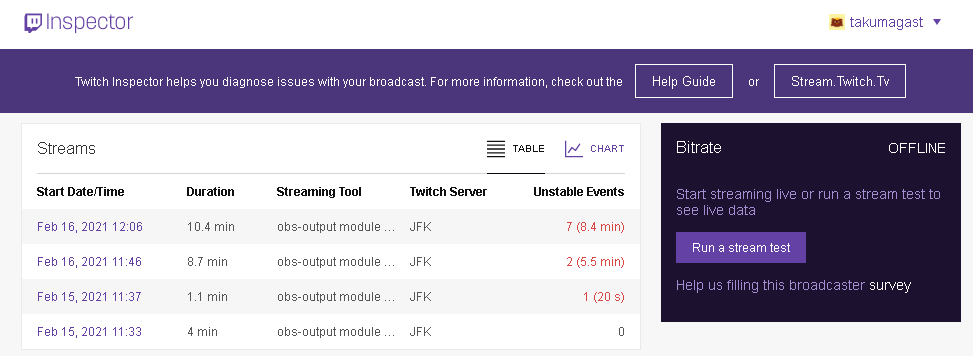
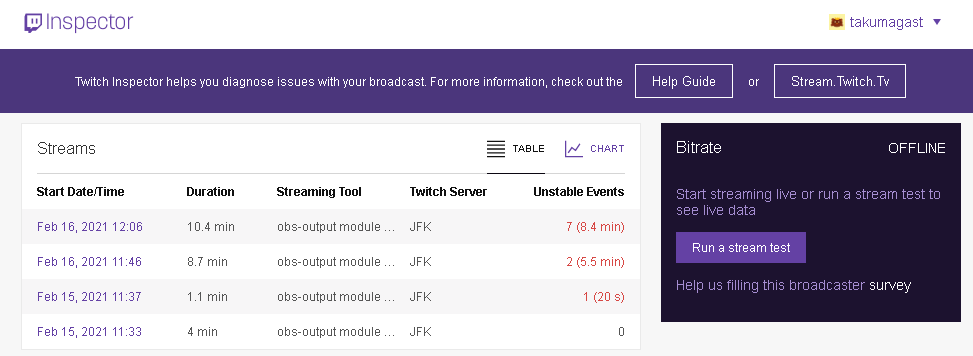
@Gastlis Can you post your most recent stream graph from https://inspector.twitch.tv please?
Chorazin
But I said YOLO and ordered a Rode Procaster
TenderSausage 2/16/2021 5:30 PM
Not a bad choice at all.
TenderSausage
@Gastlis Can you post your most recent stream graph from https://inspector.twitch.tv please?
Gastlis 2/16/2021 5:31 PM
TenderSausage 2/16/2021 5:32 PM
I can't access your graph. You'll need to take a screenshot.
Gastlis 2/16/2021 5:32 PM
Recording the game seems to yield the same results
5:32 PM
I’m using obs for context
Gastlis
I’m using obs for context
TenderSausage 2/16/2021 5:33 PM
To rephrase, both recording and streaming result in choppy output, correct?
TenderSausage
Not a bad choice at all.
Chorazin 2/16/2021 5:33 PM
I figured if I was gonna spend money on a new mic I might as well go for the best I’ll probably ever need.
Gastlis 2/16/2021 5:34 PM
Yep, exactly. Footage and sound stop and start for seconds at a time.
TenderSausage 2/16/2021 5:34 PM
@Gastlis Do you notice it in your gameplay?
Gastlis 2/16/2021 5:35 PM
Not really, sometimes it stops but that's kind of what I'm used to with my computer/connection
5:35 PM
https://i.gyazo.com/c04b06b089beb2c13b1a9575554296d9.png here's a screencap
Chorazin
I figured if I was gonna spend money on a new mic I might as well go for the best I’ll probably ever need.
TenderSausage 2/16/2021 5:35 PM
I prefer the Procaster's sound profile to the Shure SM7B, which is kind of saying something
TenderSausage 2/16/2021 5:36 PM
Please click on the most recent day/time and take a screenshot of the graph
Gastlis 2/16/2021 5:37 PM

5:37 PM
I feel like it must have something to do with my bitrate?
TenderSausage 2/16/2021 5:37 PM
@Gastlis It looks like encoder overload to me (edited)
TenderSausage
I prefer the Procaster's sound profile to the Shure SM7B, which is kind of saying something
Chorazin 2/16/2021 5:38 PM
Every review I read was like “this is basically the point of diminishing return for almost everyone” so I was like “okey dokey” I’ve heard the GoXLR Mini has plenty of power to drive it so hopefully I don’t have to get something like a Cloudlifter. (edited)
Chorazin
Every review I read was like “this is basically the point of diminishing return for almost everyone” so I was like “okey dokey” I’ve heard the GoXLR Mini has plenty of power to drive it so hopefully I don’t have to get something like a Cloudlifter. (edited)
TenderSausage 2/16/2021 5:39 PM
The Procaster doesn't require phantom power, so you should be good.
TenderSausage
@Gastlis It looks like encoder overload to me (edited)
Gastlis 2/16/2021 5:39 PM
not too sure what this means but I did get that message in obs when I went to record as opposed to stream
TenderSausage 2/16/2021 5:39 PM
What that means is that it's on your PC, not the network/internet
5:39 PM
The graph supports that conslusion for the most part
5:40 PM
Your bitrate wasn't dropping out to 0, and the few events you have are within reason.
5:40 PM
So, likely your encoder is getting overloaded. We'll have to see how system resources are being used and see if we can optimize it.
Gastlis 2/16/2021 5:45 PM
Ah, that's what I was afraid of
Gastlis 2/16/2021 5:57 PM
idk how I can check all that, I think it may be that my computer isn't up to snuff
TenderSausage 2/16/2021 5:58 PM
Possibly, or maybe we can change some settings in OBS to use a different encoder, if there's one available
5:58 PM
This can get a little lengthy, so I'll DM you to keep the channel clean.

sonicxdoom 2/17/2021 12:35 AM
can someone help me troubleshoot my capture card? I can't figure it out
12:37 AM
I'm using an Elgato HD60S and trying to stream my ps4 through my PC. The issue I'm having looks like a common one but I can't find a solution. The issue is that it's not recognizing that it's plugged into the USB3.0 port on the back of my PC. it recognizes the device in general, I can see it in my devices, but when I open up the Elgato software it just keeps telling me it needs to be plugged into a USB3.0...even though it already is.
12:40 AM
wait actually it's only recognizing the HD60S audio device
TenderSausage 2/17/2021 12:53 AM
@sonicxdoom Do you have USB 3.0 Controller drivers installed for your mobo chipset?
sonicxdoom 2/17/2021 12:55 AM
I believe so. USB Root Hub (USB 3.0) is in my device manager and it says the drivers are up to date
TenderSausage 2/17/2021 12:55 AM
Hmmm... Which motherboard?