r/streaming
💬│chat 🎨│art 🔥│memes 🔧│tech-support-archive 🎮│free-games charity-announcements 👋│introductions 🎵│tunes 🥪│food 📸│photos ⭐│commissions ❗│rules 💯│raid-targets 💖│health 🔧│tech-support-archive

this is 70 skipped frames in 6 minutes
5:40 PM
not ideal but atleast it's not the 2% I was having earlier

TenderSausage 11/15/2021 5:40 PM
If you change the Output tab to Advanced mode, we can dial it in further.
5:41 PM
The simple settings are simple, but not optimized
ah my bad, let me get that screenshot
5:42 PM


Tihson 11/15/2021 5:43 PM
A couple either things to try would be to disable recording and try only streaming. I did like you for a bit with both stream and record running with 2 different encoders and while it worked, it could sometimes be unstable. You're going to have hardware lag in a laptop since it tends to skew more to portability than extreme performance, so you can rule out the system dual-processing the data by turning off recording and then trying a test. Other thing is how are you playing on the laptop? Is it on a cooler or anything? Curious about possible thermal throttling, if any, depending on the setup and laptop brand
it's on a cooler, I don't think the fans are at 100% when I'm streaming and playing
TenderSausage 11/15/2021 5:44 PM
@Tihson isn't wrong, thermal throttling is a thing and could be a factor, but IMO I think we'd see other issues. I have a Blade 15 and I cannot play on it without a USB mouse and keyboard because of the heat. (edited)
5:45 PM
Here is what I would change
5:49 PM
Streaming Encoder Tab Encoder: NVENC Rate Contol: CBR Bitrate: 2500 Keyframe: 4 Preset: Quality Profile: Main Look-ahead: unchecked Psycho Visual Tuning: Unchecked GPU: 0 Max B-Frames: 8 (doesn't really matter, but 8)
5:51 PM
And, like @Tihson said, it would be best to test without recording if possible, and we can add that back in later on x264. (edited)
tested without recording and no skipped frames
5:58 PM

5:58 PM
on the new advanced settings
TenderSausage 11/15/2021 5:59 PM
Nice!
6:00 PM
Hopefully that will give you a visual bump while also getting petter performance
6:00 PM
since we brought back some bitrate and cut psycho tuning
tested with recording and no skipped frames as well
6:02 PM

6:02 PM
yeah
6:02 PM
all that's left is to kind of do a live test lol
6:02 PM
thank you so much guys
TenderSausage 11/15/2021 6:03 PM
Sounds good 
you guys are doing a tremendous service
TenderSausage 11/15/2021 6:04 PM
It's my pleasure. This stuff is complicated and not well documented. I just hope to make it a little less confusing.

SuperPaulio64 11/16/2021 10:13 AM
Can someone help me? The whole Facebook Gaming Live Producer set completely changed a few weeks ago. With the new setting, I still have the "Connect Video Source" blanked even though I put the stream key into my OBS platform, which I did. So I can't stream anymore unless that "option" has been checked marked. Can anyone here help me?

So I have picked up a new standalone mic to use for streams since using the gaming headset mic has become too much of a pain of not sounding robotic, I have picked up a Snowball Ice, and I am using Voicemeeter with it, but how can I reduce background noise/keyboard clicks?
TenderSausage 11/16/2021 9:29 PM
@Fox On the audio source in OBS, you can apply audio filters.
9:30 PM
There's also a noise gate in Voicemeeter, which might also work.
9:31 PM
The key will be getting the microphone out of the path of the keyboard. Do you have the iCE on your desk near your keyboard?
It’s currently about 2 ft from keyboard. I haven’t messed with OBS audio filters yet, I did some research via google and it seems like I want Voicemeeter Banana (or potato) instead of just regular voicemeeter also
TenderSausage 11/16/2021 9:40 PM
Yeah, at the bare minimum Banana
I’m gonna try Banana real fast, and I’ll report back soon. Thank you
TenderSausage 11/16/2021 9:43 PM
@SuperPaulio64 Sorry, I have no idea how to help with this.
Alright got banana downloaded now to play with the settings. Dang mechanical keyboard
So I’ve messed around with the settings and think I have it where it’s decent, minus the really loud keyboard (I’ll probably just get a non mechanical keyboard)
12:11 AM
I went ahead and ordered a windscreen for the new mic and will probably pickup a scissor stand for it as well
Thank you TenderSausage, I believe ive gotten some decent settings thanks to your tips, I appreciate it!
SuperPaulio64 11/17/2021 8:31 AM
My OBS Live keeps crashing everytime I press "start streaming" button for FB Live. Is there anyway to fix this?
TenderSausage 11/17/2021 3:43 PM
Is your OBS running as Admin? Do you have any information from the Windows Event Viewer that give the reason for the crash?

█║▌𝙼𝚊𝚍𝙼𝚊𝚗𝙼𝚘.𝚎𝚡𝚎║█║ 11/17/2021 11:01 PM
question for anyone multi streaming. what speed do you recommend? currently i stream on twitch but havent hit affiliate. Im debating multi streaming but i wanna know if i should just stick to one atm since i have more of a following there. Atm my speed is 170d 20u and i stream Destiny2/halo. My streams are usually 720p 60fps
TenderSausage 11/18/2021 1:12 AM
@█║▌𝙼𝚊𝚍𝙼𝚊𝚗𝙼𝚘.𝚎𝚡𝚎║█║ Multistreaming? (edited)
1:15 AM
Do you mean like with a service, like Restream?
Tihson 11/18/2021 1:33 AM
I think he means to Twitch as well as YT or FB, try multiple platforms at once. @█║▌𝙼𝚊𝚍𝙼𝚊𝚗𝙼𝚘.𝚎𝚡𝚎║█║ your upload could limit you a bit depending on your bitrate and what else you are doing at the same time online. If you get faster internet in the future you can push up to 25k bitrate I believe to YT for really high resolution streams which is kinda nice
TenderSausage 11/18/2021 1:40 AM
Yeah, I realize, but do they intend to use OBS to do that, or do they intend to send a single stream out to a service that would then transcode it to Twitch, YT, FB, etc? (edited)

NotAFruit 11/18/2021 1:57 AM
does anyone know how to lower the volume on a switch that is connected through a zasluke capture card? I've tried using the buttons on the switch, and changing the volume on the monitor. I've tried to find the card on volume mixer, and it shows on obs, but I have no way to control the volume it seems
TenderSausage 11/18/2021 2:33 AM
@NotAFruit I suspect that you need to turn down the input volume in Windows.
2:38 AM
If you go to Sound Settings, and open the Sound Control Panel, you can find your device in the Recording tab. Double-click the device and go to the Levels tab.

NotAFruit 11/18/2021 2:54 AM
Unfortunately that doesn't fix the issue. I think it has something to do with switch volume settings (which I can't seem to change while docked) at this point.
2:55 AM
Thanks for trying
█║▌𝙼𝚊𝚍𝙼𝚊𝚗𝙼𝚘.𝚎𝚡𝚎║█║ 11/18/2021 2:56 AM
@TenderSausage @Tihson i decided to go with restream instead of doing it all through my pc. i have mild thermal issues so i think its worth it to use restream as it would be better to outsource instead of putting it all on myself.
TenderSausage 11/18/2021 3:14 AM
@NotAFruit Where are your headphones plugged in?
NotAFruit 11/18/2021 3:24 AM
Into my capture card, which is plugged into my computer by USB. Changing the volume of the capture card didn't change the volume from my headset
TenderSausage 11/18/2021 3:43 AM
Do you have the capture card plugged into a USB 3.0 port?

4:26 AM
I might just be missing something incredibly basic, but I'll have to try again after work
TenderSausage 11/19/2021 3:39 AM
@NotAFruit I have a similar capture card, though I’ve never used it for audio. I’ll do some testing and let you know what I find.
NotAFruit 11/19/2021 3:44 AM
I think I found a work around where I plug into my computer and not the card, but that caused other issues XD

KTSpeedruns 11/19/2021 7:29 PM
Not sure if this is anything someone can help with remotely, but I do stream with my wife, and we're desperately trying to improve our sound quality. Mostly with our mic. Currently just a yeti with a boom mic. When I watch us back, I'm always disgusted at the quality of our mic input.
KTSpeedruns 11/19/2021 7:44 PM
I think the main problem is that a yeti with a boom arm is not an ideal setup to capture the voices of two people. Probably far from it. I've even asked a rep at sweetwater if there's a good mic to place on a desk for clearly capturing two voices without also capturing the garbled mess of ambiance that most mics pick up.
TenderSausage 11/19/2021 9:45 PM
@KTSpeedruns Sorry, got lazy, didn't want to type. Here's a video. (edited)
9:49 PM
I think I said capsule patterns, I meant polar patterns.
KTSpeedruns 11/20/2021 2:08 AM
I'll try that. Will probably have to redo the setup so that having the mic close doesn't block the camera from seeing us.

Kurolox 11/24/2021 12:19 PM
Hey, so I'm trying to figure out how to make a setup work
12:19 PM

12:19 PM
Shitty MS paint above, the main computer that will be doing the stream and rendering the game is on a different room than the screen and camera equipment
12:20 PM
There's no way to move the main computer to the same room or throw cables
12:20 PM
Any idea on how to make this work?
12:21 PM
I can do the streaming using AMD link, steam link or whatever LAN streaming solution you recommend, but my biggest concern is how to send the audio and camera to the main computer
12:22 PM
I could get an auxiliary computer in the other room to handle the camera and microphone, but I'm not 100% sure on how to consolidate everything on OBS in the main computer
TenderSausage 11/24/2021 4:32 PM
@Kurolox I’ll comment on this in a bit. I have a couple ideas, but I’m AFK.
Kurolox 11/24/2021 4:33 PM
I have no rush, any feedback is appreciated
4:33 PM
I thought about making an IP camera server on an auxiliary computer and open the stream back on the main computer
TenderSausage 11/24/2021 4:53 PM
@Kurolox If you want to do that, NDI would probably work
4:54 PM
To me, it seems like there are a couple options: 1. Active HDMI Extension cable from PC to TV, active USB extension (x2) for Camera and other peripherals 2. Secondary PC running NDI at TV to capture webcam and mic sent to Primary PC, active HDMI extension cable from PC to TV. (edited)
4:56 PM
Are you using controllers wirelessly, or will you be using KB/M at all?
Kurolox 11/24/2021 4:56 PM
My plan was to use wireless controllers directly connected to the TV
4:57 PM
Most LAN streaming solutions handle the input sharing themselves
TenderSausage 11/24/2021 4:58 PM
What solutions are you looking at?
Kurolox 11/24/2021 4:58 PM
AMD Link, Steam link, parsec, Moonlight
TenderSausage 11/24/2021 4:58 PM
Those would work, but I think you're going to add in unbearable latency
4:59 PM
With the exception of (maybe) steamlink
Kurolox 11/24/2021 4:59 PM
For what I've been able to test it adds about 50ms, which isn't good but it's not the worst
TenderSausage 11/24/2021 4:59 PM
Parsec, especially
Kurolox 11/24/2021 5:00 PM
My issue is that active HDMI extension sounds like a good fix but it's an expensive investment and I highly doubt about the quality of the electrical wiring of the house
TenderSausage 11/24/2021 5:00 PM
Why does that matter?
Kurolox 11/24/2021 5:00 PM
It can barely make PLC connections work
5:00 PM
I assume that active HDMI extension work on the same principle
TenderSausage 11/24/2021 5:00 PM
An active cable shouldn't be affected by your AC power
5:01 PM
It's converted to DC with the power adaptor
5:01 PM
just hook it up to a surge protector
Kurolox 11/24/2021 5:01 PM
That may be convenient then
5:01 PM
Any suggested product you can vouch for?
TenderSausage 11/24/2021 5:02 PM
Yeah, a couple, let me pull up my list
5:04 PM
I will say, I have used this cable for HDMI projectors in the past and have had no issues. That said, I wasn't trying to push 1080p60 through it. I may buy another one just to test it: https://www.amazon.com/Postta-Adapters-Support-Return-Ethernet/dp/B075YTQ2JP
HDMI Cable 50 Feet Postta Ultra HDMI 2.0V Cable with 2 Piece Cable Ties+2 Piece HDMI Adapters Support 4K 2160P,1080P,3D,Audio Return and Ethernet

5:05 PM
For active boxes, these have worked well: https://www.amazon.com/Cable-Matters-HDMI-Extender-Ethernet/dp/B00OZV04BK
Cable Matters Wall Mount HDMI Extender (HDMI Over Ethernet Cable) with TCP/IP Support for 1-to-Many Setup - Up to 300 Feet

5:06 PM
Bear in mind, this will max out at 1080p60
5:09 PM
Also, just a reminder, that even though active HDMI extenders have ethernet ports, they should not be connected to your network. They use their own transfer protocols and will mess things up if you do that.
5:09 PM
They just get connected to each other, transmitter directly to receiver. The nice thing about the active route is you can add on receiver nodes at any time. This is how places like BWW has multiple screens all running the same a/v feed. (edited)

Becky 11/25/2021 10:18 PM
Is normal obs the same as stream labs
Becky
Is normal obs the same as stream labs
Tihson 11/26/2021 12:17 AM
Yes and no. They are both OBS at their core as OBS is the base software, but is open source which means it can be used/modified by different companies and redistributed. Streamlabs modified OBS with a ton of add-ons and their own modules and then redistributed it (with features behind paywalls for specific items). Their business model is questionable as they lock a number a decently important or useful features that are usually free or can be done with a little work, behind subscription fees that aren't overly popular. Some people may like that, YMMV. Streamlabs is good for beginner streamers as it has pretty much everything you need to get up and running with only 1 or 2 clicks and automates a lot of things. Streamlabs does have a higher resource utilization and can cause issues if gaming/streaming on the same system. I personally had a ton of crashes with Streamlabs when I first started as it did not work well with Escape from Tarkov gaming and streaming on a single system. Once you are familiar with OBS or looking to do your own customization, a lot of folks move to OBS.live or just plain OBS and add/modify the modules they want to customize their layouts. Long story short, yes they are the same at their core but different in functionality. Good for starting out streaming, but has drawbacks in business model and functionality.
TenderSausage 11/26/2021 12:23 AM
@Becky FWIW, I won't be supporting Streamlabs-specific issues until major changes happen at Streamlabs. I will only be supporting OBS issues. If the issue appears as a result of core OBS functionality, I'll help out.
12:24 AM
There are people taking a less strict stance, and I won't stop them from helping here on the channel, but after what has happened over the last many years, I can't support Streamlabs or the SLOBS product.
Becky 11/26/2021 12:25 AM
Thankyou
12:25 AM
I will be sticking with normal.OBS it's ok I was just wondering

GamerCube 11/26/2021 9:07 PM
Anyone familiar with streaming/recording on mac with OBS?

Deleted User 11/26/2021 11:44 PM
Good day all, new guy here. I wanted to know if my current MacBook pro(2017) is good enough for streaming as its all I have at the moment. Specs: Processor- 2.8ghz quad core intel core i7 Memory- 16GB 2133 MHZ lpddr3 Graphics: Radeon Pro 555 2GB Intel HD graphics 630 1536 MB. I also plan to use obs if possible.

jackofallspades98 11/27/2021 2:09 AM
Hi all! In need of some technical support and wanted to talk to some real people instead of sifting through 3-year old tutorial articles that don't work. Here's my situation: I'm using a Windows 10 HP Spectre. I want to livestream my screen while having a facecam on screen. I have all the equipment and specs for livestreaming, but I still can't seem to make things work. I'm baffled. My computer has 16GB of RAM, which I'm told is plenty, my internet speed is consistent and very fast (578 down/134 up), so that's not the problem, I'm able to get things to look the way I want in OBS, and I'm familiar with how to enter the stream key into YouTube and all that. None of this is the problem. The problem is that I always run into encoder overload errors in OBS, and my Kb/s rate fluctuates. I have it set to 30,000, and when streaming, it hovers around 20-25k, occasionally tanking dramatically. It seems to be correlated somewhat to whether I'm clicked into the OBS window (vs. clicked into Chrome or something) but even that's just a theory. Also, when OBS is running, I'm basically completely unable to play a YouTube video, it's like my RAM is only able to go to one window at a time, depending on which I'm clicked into (???) I can play the YouTube video fine or I can stream (somewhat) fine, but not both. Given my technical specs and internet speed, I feel like I shouldn't be struggling to do this, right? I'd really appreciate anyone's advice here, I'm just very frustrated.

Gabbing About 11/27/2021 8:22 PM
Howdy :). I have a question about lighting... I've a very bright bulb behind me on camera, however the image is still dirty/grainy. Would I be better adding a light near the camera - Logitech C920 - to provide a better image?
TenderSausage 11/27/2021 9:30 PM
@GamerCube Yeah, what's up?
9:32 PM
@Deleted User Your hardware doesn't present any roadblocks to streaming as far as I can see. What do you intend to stream?
9:35 PM
@jackofallspades98 Your bitrates are way too high, and it's filling your ram with unprocessed video. Your encoder can't process that much data that quickly, so it's overloading. Dial your settings back for your stream encoder to the maximum allowed by the platform (ex. Twitch is capped at 6000KBps). (edited)
9:36 PM
@Gabbing About I'm not sure I understand your light situation. Do you only have a light behind you? Can you post a screenshot of your scene from your camera view?
TenderSausage
@GamerCube Yeah, what's up?
GamerCube 11/28/2021 5:53 PM
I just always seem to run into issues when I am recording with OBS in terms of audio. I can never screen record with audio from my computer/the game I am playing. I'll look it up to find a solution, but then it stops working after a while.
TenderSausage 11/28/2021 5:55 PM
@GamerCube Is it an iMac, MBA, or MBP? (edited)
GamerCube 11/28/2021 6:18 PM
iMac
6:25 PM
I just found a way to do it on YouTube, but that's what I've done in the past and worry if it will stop working eventually. I also want to know if I can get audio from only one source if I need to. For example, only recording my game but not discord VCs.

Jahlon 11/28/2021 7:04 PM
Yes you can
7:06 PM
In OBS go to Advanced Audio Properties Anything on Track 6 will be saved to the VOD. So anything you don't want on the VOD, uncheck. People will hear it during the Stream, but it won't be saved on your Twitch Vode

TenderSausage 11/28/2021 7:11 PM
@GamerCube I'd recommend looking into BlackHole from Existential Audio. It should do what you need: https://github.com/ExistentialAudio/BlackHole
BlackHole is a modern macOS virtual audio driver that allows applications to pass audio to other applications with zero additional latency. - GitHub - ExistentialAudio/BlackHole: BlackHole is a mod...
GamerCube 11/28/2021 7:35 PM
Awesome, thank you very much
Deleted User 11/28/2021 8:00 PM
@TenderSausage thanks for your response. Currently I want to stream games from my Nintendo switch. Including online play from games like smash and Pokémon. But I’ll mainly be doing BOTW or Fire emblem as well.
TenderSausage 11/28/2021 8:01 PM
@Deleted User Do you have a capture device for your Switch?
TenderSausage
@Deleted User Do you have a capture device for your Switch?
Deleted User 11/28/2021 8:03 PM
Yes I do.
TenderSausage
@Deleted User Do you have a capture device for your Switch?
Deleted User 11/28/2021 8:05 PM
It’s the mirabox one
TenderSausage 11/28/2021 8:16 PM
@Deleted User So far it seems like your hardware should stream what you're doing.
TenderSausage
@Deleted User So far it seems like your hardware should stream what you're doing.
Deleted User 11/28/2021 8:18 PM
Awesome I’m planning to run a test in a bit
 1
1

InvestmentJoy 11/29/2021 3:35 PM
Hey there, just posted a large tech question about a mobile IRL stream, any help would be appreciated as I can't find enough resources to pull it off right. Not sure if I could/should post link here, but it's mostly about creating a delayed livestream between a server/liveu/whatever and a couple cameras at a distance from where that sits. I realize a IRL backpack usually is best, but my issue is going in and out of buildings often in the livestream, while integrating multiple cameras at the same time

fullBuyTV 11/30/2021 3:30 AM
hey all - I just finished a build that I was hoping could stream at 1080p60 or at least 720p60 but my 720p60 is pretty choppy. Here's my last couple of hours in Halo Infinite at 720p60. Build is a 12600K with 16 GB DDR4, 3060 Ti, all on 750W EVGA PSU. Only thing I can think of is my house isn't wired so I'm on 5GHz band of my WiFi. I figure that's not ideal but is that likely the culprit for the choppy stream? (clip: https://www.twitch.tv/videos/1219702527)
Twitch is the world's leading video platform and community for gamers.

3:30 AM
apologies if it's a dumb question, never done any of this before
TenderSausage 11/30/2021 3:46 AM
@fullBuyTV What does your inspector report say? https://inspector.twitch.tv
fullBuyTV 11/30/2021 4:15 AM
Cool tool! Looks pretty good on that side. No recommended changes.
TenderSausage 11/30/2021 4:29 AM
On the viewer side, it's skipping a lot of frames. Can you send a screenshot of your Output and Video tabs in OBS?
Tihson 11/30/2021 4:59 AM
@fullBuyTV In addition to posting OBS settings, you may need to turn down in-game graphics settings a bit since you are trying to stream Halo. A couple friends and I started streaming Halo gameplay and we had to adjust settings down because of how graphically & resource intensive Halo is. My first stream I had to reboot the game 2 or 3 times to get the right settings for a smooth x264 stream @ 720p60 on my old system, friend had to do the same. OBS and Twitch were showing no network lag or dropped frames for me in their stream monitoring panes but I could see the lagginess in my viewer and pulled up my stream on my phone and could see the big lag. Windows resource monitor had CPU spiking to 100% with heavy RAM usage at initial high/highest in-game presets, old system: 9900k/32GB DDR4-3200/2070 Super all OC. I set my graphics preset down to medium and then turned up the basic texture resolutions settings. Shadows and light settings will eat up your CPU with anti aliasing eating up the GPU, so you can try turning those down. Halo is aggressive with their graphics presets similar to Forza Horizon 5, had to do the same there with the settings to get a smooth stream

fusion_freedom 11/30/2021 10:35 AM
Hello!
10:37 AM
I'm using an Acer Concept D laptop, can anyone tell me how to not make twitch studio and the game take up 100% of my GPU?

10:38 AM
(The big spike was when I did a 9 minute test run
Tihson
@fullBuyTV In addition to posting OBS settings, you may need to turn down in-game graphics settings a bit since you are trying to stream Halo. A couple friends and I started streaming Halo gameplay and we had to adjust settings down because of how graphically & resource intensive Halo is. My first stream I had to reboot the game 2 or 3 times to get the right settings for a smooth x264 stream @ 720p60 on my old system, friend had to do the same. OBS and Twitch were showing no network lag or dropped frames for me in their stream monitoring panes but I could see the lagginess in my viewer and pulled up my stream on my phone and could see the big lag. Windows resource monitor had CPU spiking to 100% with heavy RAM usage at initial high/highest in-game presets, old system: 9900k/32GB DDR4-3200/2070 Super all OC. I set my graphics preset down to medium and then turned up the basic texture resolutions settings. Shadows and light settings will eat up your CPU with anti aliasing eating up the GPU, so you can try turning those down. Halo is aggressive with their graphics presets similar to Forza Horizon 5, had to do the same there with the settings to get a smooth stream
fullBuyTV 11/30/2021 11:48 AM
Thanks @Tihson and @TenderSausage , I'll look further into those results and try playing with the graphics settings.
Tihson
@fullBuyTV In addition to posting OBS settings, you may need to turn down in-game graphics settings a bit since you are trying to stream Halo. A couple friends and I started streaming Halo gameplay and we had to adjust settings down because of how graphically & resource intensive Halo is. My first stream I had to reboot the game 2 or 3 times to get the right settings for a smooth x264 stream @ 720p60 on my old system, friend had to do the same. OBS and Twitch were showing no network lag or dropped frames for me in their stream monitoring panes but I could see the lagginess in my viewer and pulled up my stream on my phone and could see the big lag. Windows resource monitor had CPU spiking to 100% with heavy RAM usage at initial high/highest in-game presets, old system: 9900k/32GB DDR4-3200/2070 Super all OC. I set my graphics preset down to medium and then turned up the basic texture resolutions settings. Shadows and light settings will eat up your CPU with anti aliasing eating up the GPU, so you can try turning those down. Halo is aggressive with their graphics presets similar to Forza Horizon 5, had to do the same there with the settings to get a smooth stream
fullBuyTV 11/30/2021 1:11 PM
Gave it a shot with lower graphics settings, same result of choppiness, maybe a tiny bit better (near the end of this clip). https://www.twitch.tv/videos/1220040941
1:11 PM
Let me grab those settings.
1:11 PM

1:12 PM
using Streamlabs OBS right now
1:12 PM


mezra42 11/30/2021 1:27 PM
I have a question do I need a special camera to use a green screen or can any good webcam do?
fullBuyTV 11/30/2021 3:10 PM
Tried plugging in direct (CAT6 ethernet through a 2.5G port) and got still choppy gameplay with most at low or med at 720p60 https://www.twitch.tv/videos/1220108594
3:10 PM
internet is 150 Mbps down, 25 Mbps up
3:16 PM
720p30 looks okay but i'd think a 12600K with 16 GB DDR4 and a 3060 Ti (OC) would be able to push more consistently on lower settings
3:16 PM
i'm going to give a less demanding game like CS:GO a try at 720p60 or 1080p60 and see how things go
3:25 PM
once i figured out how to capture it in window capture haha
3:25 PM
just strikes me odd that this hardware is struggling with halo infinite at 720p60 on med/low
fullBuyTV 11/30/2021 3:45 PM
this (first game) is with 32 GB RAM now, then the second game I turned off recording in streamlabs https://www.twitch.tv/videos/1220129375
3:46 PM
very shaky at 720p60
TenderSausage 11/30/2021 4:57 PM
@fullBuyTV Switch the Output tab to Advanced, head over to the Streaming tab once that's done, and try the following settings: Encoder: NVENC Rate Contol: CBR Bitrate: 5000 Keyframe: 4 Preset: Quality Profile: Main Look-ahead: unchecked Psycho Visual Tuning: Checked GPU: 0 Max B-Frames: 8 (doesn't really matter, but 8)
1
4:59 PM
@mezra42 A standard webcam is fine, lighting is the most important component to green screen work.
5:00 PM
@fusion_freedom Lower the settings of the application you are streaming, or lower your stream quality.
 1
1
TenderSausage
@fullBuyTV Switch the Output tab to Advanced, head over to the Streaming tab once that's done, and try the following settings: Encoder: NVENC Rate Contol: CBR Bitrate: 5000 Keyframe: 4 Preset: Quality Profile: Main Look-ahead: unchecked Psycho Visual Tuning: Checked GPU: 0 Max B-Frames: 8 (doesn't really matter, but 8)
fullBuyTV 11/30/2021 5:22 PM
I see NVENC and NVENC (new) - regular NVENC?
TenderSausage 11/30/2021 5:22 PM
New, please

TenderSausage 11/30/2021 5:25 PM
No worries
fullBuyTV 11/30/2021 5:26 PM
will give this a shot, thank you! shall I leave video as suggested by Streamlabs (720p60)?
TenderSausage 11/30/2021 5:26 PM
Because you have Look-ahead unchecked, that value isn't used.
fullBuyTV
will give this a shot, thank you! shall I leave video as suggested by Streamlabs (720p60)?
TenderSausage 11/30/2021 5:27 PM
Yeah, 720p60 will work
TenderSausage
@fullBuyTV Switch the Output tab to Advanced, head over to the Streaming tab once that's done, and try the following settings: Encoder: NVENC Rate Contol: CBR Bitrate: 5000 Keyframe: 4 Preset: Quality Profile: Main Look-ahead: unchecked Psycho Visual Tuning: Checked GPU: 0 Max B-Frames: 8 (doesn't really matter, but 8)
fullBuyTV 11/30/2021 6:07 PM
Marked improvement, thank you - do you know any further adjustments I could make to smooth out the last jitters? https://twitch.tv/videos/1220223192
6:09 PM
I saw you recommended 5000 bitrate instead of the 6000 it was defaulting to. Do you think it can be lowered more in 720p60 to improve it further? Upload speed shouldn't be an issue but if it works it works
fullBuyTV 11/30/2021 7:38 PM
tried simple obs studio instead of full streamlabs with similar results, trying to eliminate variables haha
TenderSausage 11/30/2021 7:43 PM
@fullBuyTV Do you have a display with adaptive sync?
7:43 PM
In this case, a G-sync compatible display?
fullBuyTV 11/30/2021 7:45 PM
current monitor is freesync - https://www.amazon.com/gp/product/B07GD7H18F/
24-inch class curved gaming monitor free sync support ensures a stutter-free and tear-free gaming experience at any frame rate. Equipped with a curved 23.6" VA panel, the C24G1 displays a super-detailed full HD resolution (1920x1080 pixels) at a screaming 144 Hz refresh rate and 1ms response time...

7:46 PM
but will shortly be making that my secondary along with https://www.amazon.com/gp/product/B08ND5PHND/
The ViewSonic® VX2768-2KP-MHD is a 27” WQHD IPS gaming monitor built for gaming and entertainment. Featuring a 144Hz refresh rate and AMD FreeSync Premium technology, this monitor virtually eliminates screen tearing and stuttering for fluid game play during fast-paced action scenes. An ultra-fast...

7:46 PM
both freesync though
7:46 PM
I did disable G-sync in my video card settings though
7:46 PM


8:08 PM
Also, what is your monitor's refresh rate being detected as by Windows? You can find this in the Advanced Display settings window.

TenderSausage
Also, what is your monitor's refresh rate being detected as by Windows? You can find this in the Advanced Display settings window.
fullBuyTV 11/30/2021 8:19 PM
144 in windows and I believe I have Halo's max to 144 and min to 60.
8:19 PM

8:20 PM

8:20 PM
really appreciate your eyes on things and insights!
TenderSausage 11/30/2021 8:21 PM
I noticed your computer was not pushing 144fps, so it may be a good idea to set everything a bit lower at 120hz/120fps.
fullBuyTV 11/30/2021 8:25 PM
hmm, can definitely give it a shot
TenderSausage 11/30/2021 8:25 PM
I can elaborate, but it's been my experience to have FPS values match up in even numbers. Locking it at 120Hz would make everything divisible by a common whole number
8:26 PM
The idea is to dial in your game output so it's always at 120Hz.
8:26 PM
We're hoping that limiting the top end FPS will give it enough headroom to make up for those times when it would have been in the sub-120 range. (edited)
fullBuyTV 11/30/2021 8:34 PM
keeps creeping slowly better performance - https://www.twitch.tv/videos/1220363130
8:35 PM
feel like there's just those last few jitters remaining that detract from the viewing
8:37 PM
that's at 120 fps cap / 120 hz
TenderSausage 11/30/2021 8:44 PM
It looked like encoder overload to me
fullBuyTV 11/30/2021 8:44 PM
realized I had lowered my bitrate to 4.5K, upped that back up and dropped keyframe interval from 4 to 2 - thoughts/critique? https://www.twitch.tv/videos/1220369930
TenderSausage 11/30/2021 8:44 PM
There were a couple spots where you were in the teens FPS-wise from the inbound side.
fullBuyTV 11/30/2021 8:44 PM
this latest one seems pretty watchable
8:45 PM
back up from 4.5K to 5K that is
TenderSausage 11/30/2021 8:45 PM
Checking now
8:46 PM
There are some visual artifacts, but they're minor and infrequent. It's certainly watchable.
fullBuyTV 11/30/2021 8:47 PM
encoder overload would mean GPU limitation with NVENC right?
TenderSausage 11/30/2021 8:47 PM
It might be wirthwhile to do a test while online to see if multiplayer adds any kind of issues.
fullBuyTV 11/30/2021 8:47 PM
yeah true
fullBuyTV
encoder overload would mean GPU limitation with NVENC right?
TenderSausage 11/30/2021 8:48 PM
It can? You have the latest NVENC hardware available in the 30-series GPU.
8:48 PM
It's probably just a settings issue.
fullBuyTV 11/30/2021 8:49 PM
probably, will continue to test here and there - really appreciate your insights!
TenderSausage 11/30/2021 8:49 PM
No worries! Happy to help.
TenderSausage
@mezra42 A standard webcam is fine, lighting is the most important component to green screen work.
mezra42 11/30/2021 9:03 PM
Awesome thanks!

Puppet 11/30/2021 9:06 PM
I have a friend trying to get into streaming. They are looking at a Blue Yeti mic. Good or bad?
fullBuyTV 11/30/2021 9:06 PM
testing in a bot match with 5.5K bitrate https://www.twitch.tv/videos/1220378647
Puppet
I have a friend trying to get into streaming. They are looking at a Blue Yeti mic. Good or bad?
TenderSausage 11/30/2021 9:11 PM
The Blue Yeti is a fine microphone, but depending on their budget there might be better options.
TenderSausage 11/30/2021 9:15 PM
Can you send the inspector graph on this session?
TenderSausage
Can you send the inspector graph on this session?
fullBuyTV 11/30/2021 9:17 PM
hmm, I believe this is the one:

9:17 PM
may revert back to 5K, just wanted to see what jumping up 500 would do
9:18 PM
and then this one was the one prior at 5K offline

fullBuyTV 12/1/2021 2:14 AM
twitch.tv/astalyanw trying some BTB to really put it to the test
2:14 AM
disappointed that i'm dropping to 95-100 frames even at times
fullBuyTV 12/1/2021 3:46 AM
Is it possible to clip stuff afterwards or does it have to be done by viewers live? Had a few good plays I wanted to save if possible.
TenderSausage 12/1/2021 4:32 AM
You can clip it in Studio
4:33 AM
@fullBuyTV You may need to turn down some of your settings in Halo, like @Tihson mentioned. The goal is a steady 120fps
TenderSausage
@fullBuyTV You may need to turn down some of your settings in Halo, like @Tihson mentioned. The goal is a steady 120fps
fullBuyTV 12/1/2021 4:36 AM
Yeah I've turned down almost everything to low or medium. I'll double check them again to see if there's anything else to adjust.
TenderSausage
@fullBuyTV You may need to turn down some of your settings in Halo, like @Tihson mentioned. The goal is a steady 120fps
fullBuyTV 12/1/2021 2:04 PM
turned down what more i could and adjusted some windows settings (GPU scheduling namely) and things seem pretty good
2:04 PM
added my mic and will be adding webcam tomorrow once my other monitor gets here https://www.twitch.tv/videos/1220940423
2:04 PM
think this came out pretty good
fullBuyTV
turned down what more i could and adjusted some windows settings (GPU scheduling namely) and things seem pretty good
Tihson 12/2/2021 3:34 PM
If you have other games to test, you can try those and see how things look, Halo is still getting some updates and has been experiencing crashes and bugs to go along with its fairly demanding graphics. Started doing some shakedown test streams with my new system and Halo has been an absolute bear to get going well which was the same experience with my old system. My old 9900k seems to have been smoother than the new 12700k and I was at the point of running low to medium graphics settings with a capped FPS at 60fps and disabled CPU Efficiency cores, so the game appears to prefer different systems/hardware over others. Switched to Apex and the stream looked buttery smooth at 900p60 without turning down any graphics settings, so performance hits may be localized to just Halo for the time being until it gets smoothed out a bit.
Tihson
If you have other games to test, you can try those and see how things look, Halo is still getting some updates and has been experiencing crashes and bugs to go along with its fairly demanding graphics. Started doing some shakedown test streams with my new system and Halo has been an absolute bear to get going well which was the same experience with my old system. My old 9900k seems to have been smoother than the new 12700k and I was at the point of running low to medium graphics settings with a capped FPS at 60fps and disabled CPU Efficiency cores, so the game appears to prefer different systems/hardware over others. Switched to Apex and the stream looked buttery smooth at 900p60 without turning down any graphics settings, so performance hits may be localized to just Halo for the time being until it gets smoothed out a bit.
fullBuyTV 12/2/2021 3:42 PM
Thanks, yeah tested some New World at Very High and High and things were fine, though I guess I'm only technically aiming for 60 FPS there. Hopefully things get smoothed out - I think I got my settings to a good point, though I'm playing on pretty much low everything for now to get a smooth stream. Not too big a deal, I'm used to playing CSGO at 1280x720 with everything as low as possible haha
fullBuyTV 12/2/2021 4:01 PM
I just see some other streamers (admittedly with 2080ti or higher for their graphics card) stream on high settings just fine
4:01 PM
but good point with the new architecture of hte 12 gen
Tihson 12/2/2021 5:33 PM
You should be able to game at your normal resolution, it's just a tight rope with Halo settings ATM. I tried NVENC to test (Strix 3080ti OC) and the game basically told me to pound sand. Since you are on 12th Gen, you can always try disabling your E-cores in the BIOS and lock the AVX setting to 512, then try the x264 encoder to test. I seemed to be closing in on good results in Halo with the above, and as noted Apex was a gem for smoothness. Testing is showing some notable Performance gains in games without the E-cores getting in the way of data flow
Tihson
You should be able to game at your normal resolution, it's just a tight rope with Halo settings ATM. I tried NVENC to test (Strix 3080ti OC) and the game basically told me to pound sand. Since you are on 12th Gen, you can always try disabling your E-cores in the BIOS and lock the AVX setting to 512, then try the x264 encoder to test. I seemed to be closing in on good results in Halo with the above, and as noted Apex was a gem for smoothness. Testing is showing some notable Performance gains in games without the E-cores getting in the way of data flow
TenderSausage 12/2/2021 5:37 PM
I've not had this experience. I run everything on ultra with no losses. I run a 10850K and a 3080. I am curious to know if it's a RAM issue. I have 64GB RAM. What are you all running? @fullBuyTV (edited)
TenderSausage
I've not had this experience. I run everything on ultra with no losses. I run a 10850K and a 3080. I am curious to know if it's a RAM issue. I have 64GB RAM. What are you all running? @fullBuyTV (edited)
Tihson 12/2/2021 5:46 PM
Both old and new system are 32GB DDR4, Old is DDR4-3200 and new is 4000, both CL16. Both are running XMP/XMP2.0, and watching resource monitor on the new system had RAM consumption sitting at 10-11GB playing & streaming Halo. CPU usage maxed at about 20%, usually sat around 15% under load
TenderSausage 12/2/2021 5:46 PM
I'm checking now and I was wrong, everything is on High, except Simulation quality which is at Ultra.
5:47 PM
I also have Async Compute turned off. I would assume a 30-series supports it, but I haven't looked into it.

Tihson 12/2/2021 5:49 PM
I will probably try dropping back to 720p60 and create a second profile for streaming Halo. Might be ambitious at the moment to try for 900p60 for that one
TenderSausage 12/2/2021 5:50 PM
@Tihson Do you have GeForce Experience installed?
TenderSausage
I've not had this experience. I run everything on ultra with no losses. I run a 10850K and a 3080. I am curious to know if it's a RAM issue. I have 64GB RAM. What are you all running? @fullBuyTV (edited)
fullBuyTV 12/2/2021 5:51 PM
32 GB DDR4 3600, just CL18, equivalent to 3200 CL16 if I recall correctly.
Tihson
You should be able to game at your normal resolution, it's just a tight rope with Halo settings ATM. I tried NVENC to test (Strix 3080ti OC) and the game basically told me to pound sand. Since you are on 12th Gen, you can always try disabling your E-cores in the BIOS and lock the AVX setting to 512, then try the x264 encoder to test. I seemed to be closing in on good results in Halo with the above, and as noted Apex was a gem for smoothness. Testing is showing some notable Performance gains in games without the E-cores getting in the way of data flow
fullBuyTV 12/2/2021 5:51 PM
And yes, I'm playing in my normal 1920x1080 but most graphical settings otherwise on low.
TenderSausage
@Tihson Do you have GeForce Experience installed?
Tihson 12/2/2021 5:51 PM
I do not, just the drivers. Just pulled the newest ones yesterday
TenderSausage 12/2/2021 5:52 PM
Okay, same. I'm trying to see what our biggest differences is and put it in a matrix.
5:53 PM
What chipsets are you all running?
fullBuyTV 12/2/2021 5:53 PM
690 - MSI Pro Z690-A DDR4
TenderSausage 12/2/2021 5:54 PM
Interesting. I'm on Z590.
fullBuyTV 12/2/2021 5:54 PM
You said you have e cores disabled in bios?
TenderSausage 12/2/2021 5:55 PM

fullBuyTV
You said you have e cores disabled in bios?
TenderSausage 12/2/2021 5:55 PM
I'll have to check that. I'm not sure.
TenderSausage
Click to see attachment 🖼️
fullBuyTV 12/2/2021 5:57 PM
Is your secondary monitor 60 hz or do you have that limited? Any advantage you think in limiting the chat / secondary monitor refresh?

fullBuyTV
Is your secondary monitor 60 hz or do you have that limited? Any advantage you think in limiting the chat / secondary monitor refresh?
TenderSausage 12/2/2021 5:59 PM
I do have the secondary set to 60Hz, because that's the native refresh for it. I have my G-Sync monitor limited to 120Hz instead of 144Hz.
TenderSausage 12/2/2021 6:03 PM
Just for reference, I'm also running DDR4, running XMP2.0 at 3200 CAS16
fullBuyTV 12/2/2021 6:05 PM

6:05 PM
hmmm
6:05 PM
NZXTCAM doesn't like them
6:05 PM
clock speed and timings are shown correctly in bios though IIRC
TenderSausage 12/2/2021 6:06 PM
Interesting. Might be too new of a chipset for the software.
6:06 PM
Check for an update, maybe?
fullBuyTV 12/2/2021 6:06 PM
yeah this was just built a couple of days ago but I can double check
TenderSausage 12/2/2021 6:08 PM
@Tihson I forgot you posted specs already https://discord.com/channels/408977299459801088/751606041954877471/912342336359522334
fullBuyTV 12/2/2021 6:08 PM
That doesn't need to be the only monitoring software though - mainly for the case lighting and the monitoring is a nice extra for temps and such.
6:09 PM
I'll have to check what OpenHardwareMonitor can see.
TenderSausage 12/2/2021 6:09 PM
I use CPUID software, like CPU-Z and HWMonitor
6:10 PM
And Speccy sometimes
6:10 PM
I'll have to look at OHM. It's been a while.
6:12 PM
It doesn't look like it's being updated on the GitHub  https://github.com/openhardwaremonitor/openhardwaremonitor
https://github.com/openhardwaremonitor/openhardwaremonitor
Open Hardware Monitor. Contribute to openhardwaremonitor/openhardwaremonitor development by creating an account on GitHub.

fullBuyTV 12/2/2021 6:12 PM
ouch
TenderSausage 12/2/2021 6:12 PM
11 months of no code changes
6:12 PM
Maybe there's a forked build somewhere out there?
fullBuyTV 12/2/2021 6:13 PM
for cpu-z would you just go classic, or match my motherboard manufacturer in the custom editions (MSI)
6:13 PM
I see the custom editions reference Alder Lake and Z6xx platform
6:14 PM
ah, classic should also do it
6:14 PM
just hate to get any bloatware along with the core stuff
6:14 PM
or maybe classic won't - seems to be tied to those custom versions
TenderSausage 12/2/2021 6:14 PM
I run the ROG version
6:15 PM
Simply because I have a Asus MB, and no other real reason.
6:15 PM
It just has a skin, as far as I can tell
fullBuyTV 12/2/2021 6:15 PM

6:15 PM

TenderSausage 12/2/2021 6:18 PM
Which CPU again?

TenderSausage 12/2/2021 6:20 PM
I haven't benched in a while, now I'm curious
6:24 PM
[ut2rf4] Validated Dump by Anonymous (2021-12-02 19:23:21) - MB: Asus TUF GAMING Z590-PLUS WIFI - RAM: 65536 MB
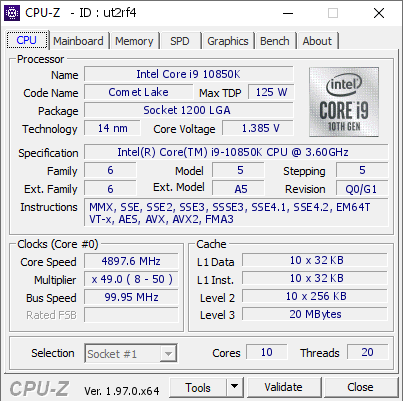
6:26 PM
I should probably investigate why it's reporting 95degC as my CPU temp.
 1
1
6:32 PM
It's because I was stressing it when I submitted the report. I watched it jump from 46 to 92 as soon as I pressed the button.
6:35 PM
I need to research the 12th Gen Intel chips a bit more. This Performance + Efficient Cores thing is odd.
6:37 PM
So each performance core can be hyper-threaded, and the other four efficient cores are lower power single thread. So (6x2)+4 = 16 Total Threads
6:38 PM
Pretty interesting.
6:42 PM
I wonder how Windows prioritizes processes to the performance cores versus the efficient cores.
Tihson 12/2/2021 6:46 PM
Apparently Windows 10 is kinda meh when deciding what cores to send stuff to, basically lower priority/throughput stuff gets bumped to E-cores while the high priority stuff stays in the P-cores. They are supposed to be optimized for Windows 11 which introduces a more efficient task scheduler to use the cores better
6:47 PM
That's why folks are going into the BIOS for the Z690 boards and finding that turning off E-cores can yield slightly better results since it forces all traffic to the P-cores
TenderSausage 12/2/2021 6:48 PM
Ah, I have no e-cores. That answers the question from before, @fullBuyTV.
6:49 PM
Have y'all looked into this? There’s an option in the BIOS that, when enabled, means the Scroll Lock can be used to disable/park the E-cores, meaning nothing will be scheduled on them when the Scroll Lock is active.
6:50 PM
There's an interesting article on Anandtech that talks about it a bit: https://www.anandtech.com/show/17047/the-intel-12th-gen-core-i912900k-review-hybrid-performance-brings-hybrid-complexity/3

Tihson 12/2/2021 6:55 PM
Yeah, came about because of DRM software that was triggering and killing games when processes moved across cores since it saw the cores as different hardware devices
6:55 PM
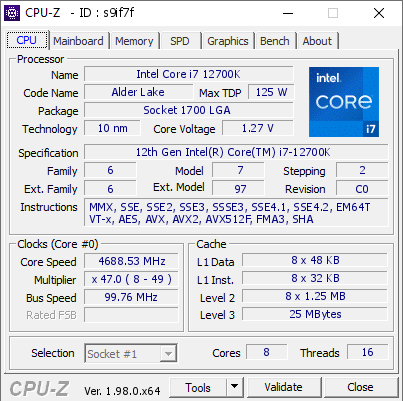
[s9if7f] Validated Dump by DESKTOP-4ONGMEJ (2021-12-02 19:51:00) - MB: Asus ROG STRIX Z690-A GAMING WIFI D4 - RAM: 32768 MB
TenderSausage 12/2/2021 6:55 PM
I mean, that's a normal heuristic to look for.
6:56 PM
So the 12700K doesn't have e-cores either?
Tihson 12/2/2021 6:57 PM
It has them, I just have them disabled in the BIOS
TenderSausage 12/2/2021 6:57 PM
Oh, I see
Tihson 12/2/2021 7:10 PM
With E-cores enabled https://valid.x86.fr/f6f0x7
[f6f0x7] Validated Dump by DESKTOP-4ONGMEJ (2021-12-02 20:08:39) - MB: Asus ROG STRIX Z690-A GAMING WIFI D4 - RAM: 32768 MB

TenderSausage 12/2/2021 7:11 PM
And that's under bench?
Tihson 12/2/2021 7:12 PM
Yeah, that was the bench
TenderSausage 12/2/2021 7:12 PM
Is there any gain running a stress on it?
Tihson 12/2/2021 8:01 PM
Stress topped out about 9465 on the score. Realized my memory timings didn't take on the initial and updated bench was at 9423. Puts it neck and neck with the 5900x
fullBuyTV 12/2/2021 9:28 PM
Interesting, yes I heard Intel worked with Microsoft to develop scheduling in Windows 11 that takes advantage of the E cores, but that Windows 10 won't recognize the abilities of the E cores. Running Windows 10 here.
Tihson 12/3/2021 3:23 PM
I finally got a stable Halo stream last night, was able to up the presets to medium and stream @ 900p60, it is actually a bit of me being an idiot for some of the previous instability. When I built my new system, I was messing with the GPU and had been testing undervolting the card and benchmarking with adjusted memory timings before taking off for Thanksgiving vacation. Forgot that the card still had the undervolted profile set and hadn't done a ton of stress testing on it, so likely why things were lagging and crashing a bit. Reset the card to stock voltage and clock speeds and was able to stream at: 900p60, NVENC New, Quality preset, High profile, Lanczos (going to switch back to Bicubic), Keyframe & Max B-frames @ 2, and CBR set a bit higher at 7000, was able to push up to 8500 but Twitch started giving "Unstable" warnings (1Gb fiber internet up/down, so plenty of bandwidth headroom). Also locked my monitor @ 120hz (runs @ 165hz native) and capped in game FPS @ 120 Setting the in-game graphics to the high preset started introducing a little stuttering again, but going to try doing 720p60 as I think that will still look good with the better in-game graphics. So yeah, I'm an idiot, don't do system tweaking if you don't have the time to follow through with it
Tihson
I finally got a stable Halo stream last night, was able to up the presets to medium and stream @ 900p60, it is actually a bit of me being an idiot for some of the previous instability. When I built my new system, I was messing with the GPU and had been testing undervolting the card and benchmarking with adjusted memory timings before taking off for Thanksgiving vacation. Forgot that the card still had the undervolted profile set and hadn't done a ton of stress testing on it, so likely why things were lagging and crashing a bit. Reset the card to stock voltage and clock speeds and was able to stream at: 900p60, NVENC New, Quality preset, High profile, Lanczos (going to switch back to Bicubic), Keyframe & Max B-frames @ 2, and CBR set a bit higher at 7000, was able to push up to 8500 but Twitch started giving "Unstable" warnings (1Gb fiber internet up/down, so plenty of bandwidth headroom). Also locked my monitor @ 120hz (runs @ 165hz native) and capped in game FPS @ 120 Setting the in-game graphics to the high preset started introducing a little stuttering again, but going to try doing 720p60 as I think that will still look good with the better in-game graphics. So yeah, I'm an idiot, don't do system tweaking if you don't have the time to follow through with it
fullBuyTV 12/4/2021 12:20 AM
High at 720p60 will look awesome. I'm running pretty much everything on Low at 720p60 and people appreciate the crispness and smoothness of the stream. Glad to hear it's straightened out though!
Tihson
I finally got a stable Halo stream last night, was able to up the presets to medium and stream @ 900p60, it is actually a bit of me being an idiot for some of the previous instability. When I built my new system, I was messing with the GPU and had been testing undervolting the card and benchmarking with adjusted memory timings before taking off for Thanksgiving vacation. Forgot that the card still had the undervolted profile set and hadn't done a ton of stress testing on it, so likely why things were lagging and crashing a bit. Reset the card to stock voltage and clock speeds and was able to stream at: 900p60, NVENC New, Quality preset, High profile, Lanczos (going to switch back to Bicubic), Keyframe & Max B-frames @ 2, and CBR set a bit higher at 7000, was able to push up to 8500 but Twitch started giving "Unstable" warnings (1Gb fiber internet up/down, so plenty of bandwidth headroom). Also locked my monitor @ 120hz (runs @ 165hz native) and capped in game FPS @ 120 Setting the in-game graphics to the high preset started introducing a little stuttering again, but going to try doing 720p60 as I think that will still look good with the better in-game graphics. So yeah, I'm an idiot, don't do system tweaking if you don't have the time to follow through with it
fullBuyTV 12/4/2021 12:21 AM
Also looked back in your history to see your build - looks awesome. Must destroy games too.

Boosta 12/6/2021 6:06 AM
Hey everyone, ive been having a problem with streamelements obslive and my stream deck. Only the start broadcasting button doesnt work. Anyone else had this problem
6:06 AM

fullBuyTV 12/6/2021 3:27 PM
not sure where else to go with this channel-wise, but thoughts on cam framing? also, case lighting is set to slowly cycle through rgb (super rainbow on nzxt's software). should I keep it a consistent color? (edited)
3:27 PM
looking at chat:

3:27 PM
looking at gaming monitor + gaming face activated:

Boosta 12/6/2021 5:06 PM
Hey, I think it looks ok. I personally have my cam up at an angle, a cheap tripod or webcam boom arm will give you a lot of flexability so your profile doesnt change too much when you look at a different monitor
5:06 PM
@fullBuyTV
5:07 PM
Sort of between the two monitors is a good move
5:07 PM
remember, distance can be your friend with a webcam angle
5:11 PM
 1
1
5:11 PM
That's where mine sits. (edited)
Boosta 12/6/2021 5:41 PM
also the rgb is fine, i like it, it will help with editing a bit as markers
5:41 PM
very nice build
fullBuyTV 12/6/2021 10:49 PM
Thanks! Appreciate the insights.

KingFlip 12/7/2021 3:49 PM
Hi! I found it to be cheaper if I buy 2 single sticks of ram instead of a 2pc set. Will I encounter any problems if I buy the same stick of ram twice instead of opting for a 2x set? Thanks!
TenderSausage 12/8/2021 1:43 AM
@KingFlip Possibly. I will give a more complete reply in a bit.
Deleted User 12/9/2021 12:30 AM
Trying to adjust my settings in obs to capture audio but when I click properties I’m not getting those additional options like I see in tutorials

12:32 AM
Wait I got it resolved I was using the preset I just realized
12:33 AM
Sorry to spam like this but I’m still not getting the audio option I thought I fixed it
TenderSausage 12/9/2021 2:13 AM
@Deleted User I'll have to look into that. My best guess is that it can't decode the audio it's receiving. I'll grab my Switch and see if I can get that issue myself.
2:14 AM
@KingFlip To explain re: your memory question, I can personally attest to seeing issues with timings, and even completely different chips in some cases, being used on the same model of RAM.
2:17 AM
Here's an example I ran into where I bought two G.Skill F4-3200C16-16GTZR kits, one kit having Samsung B-die, and the other having SK Hynix. Having both kits, with the same exact part number, in my PC would cause it to not boot. Using the kits separately worked without issue. You can see in this doc the screenshots I took to prove to G.Skill that they were not compatible with each other.

2:19 AM
The issue boiled down to the Samsung chips having faster microtimings than the SK Hynix chips, and they just couldn't sync up, even on XMP 2.0 profiles.
TenderSausage
@KingFlip To explain re: your memory question, I can personally attest to seeing issues with timings, and even completely different chips in some cases, being used on the same model of RAM.
KingFlip 12/9/2021 2:22 AM
Oh wow I didn't know same ram models could have different chips in them. Thanks!
TenderSausage 12/9/2021 2:22 AM
They shouldn't, but with the "shortages", you never know

johnjohn 12/9/2021 2:52 AM
Hey everyone I am having an issue i cannot resolve
2:53 AM
Im trying to run my xbox to elgato to mac and monitor. I cant seem to get it to work. The video passes through to the monitor but not into OBS unless i plug the hdmi out into the mac.... but then i cant play using my monitor
TenderSausage 12/9/2021 2:55 AM
Which Elgato product are you using?
johnjohn 12/9/2021 2:55 AM
hd60s+
TenderSausage 12/9/2021 2:58 AM
Can you take a picture of how you have it connected?
johnjohn 12/9/2021 3:02 AM
yes one sec
3:05 AM
sorry not yet done my cable management so i tried to make this clear

johnjohn 12/9/2021 3:35 AM
So now with that setup i just get this black screen on obs and the elgato Game Capture software (ofc they are not open at the same time)

3:37 AM
but if I plug the HDMI out into my HDMI to USBC dongle it works

TenderSausage 12/9/2021 4:20 AM
@johnjohn Plug the HD60S+ directly into your macbook. Do not use the USB hub. (edited)
johnjohn 12/9/2021 4:46 AM
I tried a usbc to usbc direct to the macbook. Didnt work. cant use the cord they gave be cuz its a usbc to regular 3.0 unless i have the dongle
4:47 AM
it works through the dongle i found out if i completely remove the out hdmi to my monitor it passes to obs and the mac. So the problem is somewhere with it wanting to redirect to the monitor.
TenderSausage 12/9/2021 4:56 AM
Do you have the Elgato software installed? https://edge.elgato.com/egc/macos/egcm/2.11.13/final/Game_Capture_HD_2.11.13.zip?_ga=2.214220755.535370549.1639025755-1593745887.1634671453
4:57 AM
You can use the Elgato software to verify that the device is working and has the latest firmware.
4:57 AM
However, if you have an M1, it won't work.
4:59 AM
Does this describe your issue, @johnjohn ? When using Video Capture hardware, there are connectivity issues when connecting to a M1 Mac that only has Thunderbolt 3 ports. This issue will happen whether or not USB-C to USB-A adapters are used. If you use the USB-A port built into a M1 Mac Mini with Video Capture, the problem may not happen. We are looking into this issue now. (edited)
johnjohn 12/9/2021 5:13 AM
I have the software and my macbook isnt an M1. It recognizes that the capture card is there for sure because if i completely unplug it then it throws a "please connect your device". Otherwise when I try to pass through to the monitor and macbook if just gives me that black screen
1
5:14 AM
All firmware and software is up to date as well
5:14 AM
do i simply need an hdmi splitter? I mean thats not how it supposed to work but damn obviously something in my setup is wonky enough to break this

Shanecus 12/9/2021 5:17 AM
I always just plug it all in like you had and then I switch my channel input over to whatever the elgato is plugged into. In bed but I can send photos tomorrow if needed
TenderSausage 12/9/2021 5:19 AM
@Shanecus Might help. It's one of the few Elgato products I don't own.

Sachiru 12/9/2021 7:08 AM
Q: Any cameras with similar quality to the Logitech Brio but not as expensive?
Shanecus
I always just plug it all in like you had and then I switch my channel input over to whatever the elgato is plugged into. In bed but I can send photos tomorrow if needed
johnjohn 12/9/2021 1:23 PM
Yes plz!
johnjohn 12/9/2021 1:33 PM
GUYS I FIXED ITTT OMG
1:34 PM
I had to go into my xbox settings and change my display to 1080p at 60hz. I had it set to 1440p at 120hz

Patricio 12/9/2021 3:02 PM
hey everyone! I do live coding, and my Mac can't handle all the software + streaming without going slow, hot, etc I would like to use my Windows Desktop to do the heavy lifting. So I'm thinking:
- video capture for the Face Camera
- usb audio, from mix table + mic
- video capture from the Mac monitor. I can use Mac's HDMI out -> Splitter -> FullHD monitor + Full HD video capture in Windows So, if I would be streaming with OBS, all would be OK! The issue here is: I'm using MelonApp. It makes it very easy to incorporate guests on the stream.
johnjohn
I had to go into my xbox settings and change my display to 1080p at 60hz. I had it set to 1440p at 120hz
Shanecus 12/9/2021 3:18 PM
Nice! If you need help I can mess with stuff after work still. I get up at 3:30 am then work til 1:30 so a little strange on availability sorry xD
TenderSausage
@Deleted User I'll have to look into that. My best guess is that it can't decode the audio it's receiving. I'll grab my Switch and see if I can get that issue myself.
Deleted User 12/9/2021 3:54 PM
Thanks
TenderSausage 12/9/2021 4:09 PM
@Patricio Are you talking about using a headless HDMI adapter? https://www.amazon.com/Headless-Display-Emulator-Headless-1920x1080-Generation/dp/B06XT1Z9TF
HDMI Dummy Plug,Headless Ghost, Display Emulator (Fit Headless-1920x1080 New Generation@60Hz)

4:10 PM
They sell them in a variety of connection types, so you can pick the one you need.
4:10 PM

TenderSausage
@Patricio Are you talking about using a headless HDMI adapter? https://www.amazon.com/Headless-Display-Emulator-Headless-1920x1080-Generation/dp/B06XT1Z9TF
Patricio 12/9/2021 4:18 PM
Cool, I didn't know about these! But what do they do apart from turning on hardwareGPU? I need to have the output of my mac, as a screen in windows... Just finished a phone call where a friend might have given me the solution...
But what do they do apart from turning on hardwareGPU? I need to have the output of my mac, as a screen in windows... Just finished a phone call where a friend might have given me the solution...
4:18 PM
Let me make more clear, maybe. Imagine you have computer 1 and computer 2
TenderSausage 12/9/2021 4:18 PM
That just sounds like display capture using a capture card on the PC
Patricio 12/9/2021 4:19 PM
on computer 1, you go to google meet (edited)
4:19 PM
you can put "2 slots" of video there, one as a camera, other as a physical screen
4:20 PM
so, in computer 1, i have a camera via HDMI, and a screen from computer 2 also as hdmi
4:20 PM
thwn then i go inside Browser to share screen, I can't put the signal from a HDMI connection
TenderSausage 12/9/2021 4:21 PM
You'd need a capture device on the Mac
Patricio 12/9/2021 4:21 PM
I mean, I can put the screen computer 2 hdmi as a camera... but then I loose the share of a camera
4:21 PM
i have 3 capture cards, no problem
4:21 PM
but how could i do that?
TenderSausage 12/9/2021 4:21 PM
HDMI out from PC to capture card, USB In to Mac (edited)
Patricio 12/9/2021 4:21 PM
(sorry to interrupt, but is other way around)
TenderSausage 12/9/2021 4:22 PM
K, then flip it
Patricio 12/9/2021 4:22 PM
(yeah, just said because of some software compatiblities)
johnjohn
do i simply need an hdmi splitter? I mean thats not how it supposed to work but damn obviously something in my setup is wonky enough to break this
Boosta 12/10/2021 12:15 AM
Your mac might not provide enough onboard power with other USBs plugged in
12:15 AM
A powered USB hub will most likely solve your problem
12:16 AM
Sounds like everything is working, but the external capture card itself is not receiving enough power, or is faulty
12:16 AM
Laptops and powered USB hubs go together like peas and carrots
12:17 AM
Since laptops run on D/C instead of A/C they put out and require far less power than a traditional machine, adding a powered USB will completely remove that limitation and the number of slots

DarkRa 12/10/2021 2:08 AM
Using obs studio my capture card recording freezes . But on streamlabs obs it doesn't

level_up20 12/10/2021 5:33 AM
Guys do i need capture card to stream in obs?
5:34 AM
What if i want to stream mobile game to twitch?
level_up20
Guys do i need capture card to stream in obs?
DarkRa 12/10/2021 6:59 AM
Streamlabs obs has mobile verison. Or could use a capture card for phone.
level_up20 12/10/2021 7:02 AM
Oh i didnt know that, thanks!
Boosta
A powered USB hub will most likely solve your problem
TenderSausage 12/10/2021 3:38 PM
I disagree, but you can try @johnjohn (edited)
Boosta 12/10/2021 5:15 PM
well, in my line of work, student laptops with underpowered usb devices is a big problem, especially with thinner models
5:17 PM
just a suggestion, there's never any bullseye in the IT industry lol
TenderSausage 12/10/2021 5:22 PM
With cameras and video capture specifically, hubs will occupy too many devices on the bus and prevent the camera from utilizing the full bandwidth, in my experience. (edited)
5:24 PM
It's not a huge issue for anything lower than 1080p30, but above that, it's crucial
Boosta 12/10/2021 5:25 PM
That also could be possible depending on the hardware involved, I switched form an external to an internal capture card because of latency
TenderSausage 12/10/2021 5:25 PM
Same
5:26 PM
im only a 1080p gamer, so hopefully im future proofed for a while

bellanxs. 12/10/2021 9:08 PM
Does anyone know how to fix a monitor that keeps glitching? I’ve tried two monitors so it’s not the monitor itself! I feel like it’s my PC but it’s new 
Boosta 12/10/2021 9:34 PM
Can you define glitching?
9:34 PM
Is it creating little shapes instead of a picture?
9:34 PM
Or is it like stuttering every now and then?
bellanxs. 12/10/2021 9:50 PM
9:50 PM
I’ve tried two different monitors and hdmi cables the pc is new so I’m super confused
the pc is new so I’m super confused
Boosta 12/10/2021 10:01 PM
does your pc have a GPU? Its important to plug your monitor into the gpu instead of the motherboard, make sure its snug too
10:01 PM
and there are a lot of bad hdmi cables, so test them on a tv or something to make sure they work
10:03 PM
also depending on if you have amd or nvidia
10:03 PM
you want to download their software to update your drivers
10:03 PM
it does all that for you
bellanxs. 12/10/2021 10:06 PM
Updating my drivers rn! Hopefully it works! Thanks for the help
TenderSausage 12/10/2021 10:15 PM
That looks like a driver issue to me. You're on the right path so far.
bellanxs. 12/10/2021 11:08 PM
It was the drivers after all! Got it updated and everything works so far!! Thank you : D
1
bellanxs.
It was the drivers after all! Got it updated and everything works so far!! Thank you : D
Boosta 12/11/2021 1:33 AM
glad you got it up and running, that would be an awfully distracting thing to deal with
LeperMessiah 12/12/2021 6:47 PM
Does anyone here have experience with Voicemeeter and Warzone (dual PC setup)? When I have VM on, ingame voice chat does not work. It works in Vanguard. I have tried so many different options and I can't figure it out. I can explain the whole setup if anyone has a clue how to help me with it.
Boosta 12/12/2021 8:20 PM
You can try routing the audio settings once the game is running.
8:20 PM
Alt tab out and open Sound Settings, go down to advanced
8:20 PM
and select your channels from the drop down
8:20 PM
@LeperMessiah
8:21 PM
I personally had trouble with warzone about 6 months ago, hope they fixed their sound\
TenderSausage 12/13/2021 1:13 AM
@LeperMessiah I may be able to help you at some point. Are you using Banana, or Potato?
TenderSausage
@LeperMessiah I may be able to help you at some point. Are you using Banana, or Potato?
LeperMessiah 12/13/2021 1:16 AM
Sounds great! Potato right now. Have watched ton of videos on VM but I can't figure out exactly this problem. Might be Warzone though, because everything else I throw at VM, works. No rush, just when you got time. Still waiting on a webcam to arrive anyway so won't be streaming until then (edited)
LeperMessiah
Sounds great! Potato right now. Have watched ton of videos on VM but I can't figure out exactly this problem. Might be Warzone though, because everything else I throw at VM, works. No rush, just when you got time. Still waiting on a webcam to arrive anyway so won't be streaming until then (edited)
TenderSausage 12/13/2021 1:16 AM
Sounds good. I'll do some digging to see if there are other users that are seeing the same issue.
1:17 AM
Sounds like something specific with WZ, so it should come up.
TenderSausage
Sounds good. I'll do some digging to see if there are other users that are seeing the same issue.
LeperMessiah 12/13/2021 1:17 AM
I googled it to no avail
LeperMessiah
I googled it to no avail
TenderSausage 12/13/2021 1:17 AM
Bummer. I'll ask around with some of my other colleagues as well.
1
LeperMessiah 12/13/2021 1:18 AM
It did work at one point about a month ago but I don't know what changed, and exactly when
TenderSausage
Bummer. I'll ask around with some of my other colleagues as well.
LeperMessiah 12/13/2021 1:18 AM
Thanks a bunch
TenderSausage 12/13/2021 1:18 AM
It's totally possible it's a simple routing issue. It's happened to me 1,000 times
LeperMessiah
Does anyone here have experience with Voicemeeter and Warzone (dual PC setup)? When I have VM on, ingame voice chat does not work. It works in Vanguard. I have tried so many different options and I can't figure it out. I can explain the whole setup if anyone has a clue how to help me with it.
Boosta 12/13/2021 1:21 PM
It'd also be nice to know exactly how voice chat isnt working, is your mic not transmitting or can you not hear your teammates?
Boosta
It'd also be nice to know exactly how voice chat isnt working, is your mic not transmitting or can you not hear your teammates?
LeperMessiah 12/13/2021 2:31 PM
When VM is turned on, my mic in WZ isnt transmitting. I can hear my tesmmates. It’s the same with Arctis 7 (usb) and the Yeti (also usb). They both transmit fine over VBAN to my streaming PC, just not WZ
Boosta 12/13/2021 2:37 PM
Try this
2:37 PM
while the game is open
2:37 PM
Settings > System > Sound. In the Sound settings, scroll down to the “Other Sound Options” section, and then click the “App Volume And Device Preferences” option
2:38 PM
From there, find warzone
2:38 PM
and make sure the appropriate input and output routing settings are properly configured to voicemeeter instead of your defaults
2:38 PM
id have to redownload warzone again to confirm, but i dont believe they have integrated routing
2:39 PM
Vanguard and Cold war do have routing built into the software if i recall correctly
2:39 PM
So you probably will need to direct your mic input directly to warzone
2:40 PM
also make sure that your push to talk key is functioning and bound to the correct key if you're using it, Warzone and Cold war had different voice chat buttons for some reason by default
2:42 PM
Its essential that you access the windows sound settings WHILE the game is open, otherwise the options will not appear
2:45 PM
Also voicemeeter doesnt care what mic you're using it routes audio out into channels, one of those channels, usually 2/AUX is reserved for microphone use (edited)
TenderSausage 12/13/2021 5:02 PM
@LeperMessiah What is your default communications device set to in Windows? You can find this by going to Control Panel - Sound - Recording tab. In this case, Warzone uses the default communication device defined in Windows.
TenderSausage
@LeperMessiah What is your default communications device set to in Windows? You can find this by going to Control Panel - Sound - Recording tab. In this case, Warzone uses the default communication device defined in Windows.
LeperMessiah 12/13/2021 5:12 PM
Tried that. No such luck
TenderSausage 12/13/2021 5:12 PM
What device is selected?
LeperMessiah 12/13/2021 5:13 PM
Arctis 7 Chat
5:13 PM
Tried with Yeti too
Boosta 12/13/2021 5:14 PM
Doesn't sound like voicemeeter is being used for output then
TenderSausage 12/13/2021 5:14 PM
It is, just not the way you're thinking
Boosta 12/13/2021 5:16 PM
Well, if he's using native mics, then its not being used for anything
TenderSausage 12/13/2021 5:16 PM
I'm not familiar enough with the Arctix software to know if it might be an issue. I know the Yeti is not a problem; I can test this further.
Boosta
Well, if he's using native mics, then its not being used for anything
TenderSausage 12/13/2021 5:16 PM
What? This sentence doesn't make sense.
5:16 PM
Native mics?
Boosta 12/13/2021 5:16 PM
You can select either the VM output or just your raw mic from the windows recording settings
TenderSausage 12/13/2021 5:17 PM
What does that have to do with it being native?
Boosta 12/13/2021 5:17 PM
VM wouldnt be interfering if it's not even in the loop
TenderSausage 12/13/2021 5:17 PM
It can run in tandem
5:17 PM
It doesn't have to be exclusive
Boosta 12/13/2021 5:18 PM
Yea, it can, I was just saying since he's not using a VM output that VM likely has nothing to do with it
TenderSausage 12/13/2021 5:19 PM
How exactly did you determine that?
5:19 PM
Did you look at their VM interface?
Boosta 12/13/2021 5:19 PM
Don't need to, selecting the mic in the windows menu bypasses VM
TenderSausage 12/13/2021 5:19 PM
Unless there's another software in the way that's taking exclusivity
5:19 PM
Did you check that?
5:20 PM
Maybe the Arctis software is the conflict
Boosta 12/13/2021 5:20 PM
That software wouldn't be vm is my point
TenderSausage 12/13/2021 5:20 PM
But it could cause the issue (edited)
Boosta 12/13/2021 5:20 PM
I know that from experience, i bypassed it all the time when it gave me problems
5:20 PM
Hmm
TenderSausage 12/13/2021 5:21 PM
I'm just saying I don't know enough about the issue to do anything other than ask questions. I'm just trying to see if I missed something.
Boosta 12/13/2021 5:21 PM
Yea im just brain storming on it
5:22 PM
I had a plague of audio issues so i know it can be really rough to diagnose sometimes
1
5:23 PM

5:23 PM
ah
5:23 PM
looks like warzone has added their own routing
5:23 PM
I would try that first and foremost
5:25 PM
I used to stream warzone, it was great once i had everything working
Boosta
Doesn't sound like voicemeeter is being used for output then
LeperMessiah 12/13/2021 5:37 PM
I think I have tried all combinations. It did work for a couple weeks about a month ago but then stopped working, maybe when I moved from Banana to Potato. I might have changed something inadvertently. At this point I am about to reinstall Windows to reset everything
5:37 PM
But I have tried streaming on the gaming PC (2080 TI). Seems to be working fine. Maybe I will just stick with that, then I won't really need VM
LeperMessiah
But I have tried streaming on the gaming PC (2080 TI). Seems to be working fine. Maybe I will just stick with that, then I won't really need VM
Boosta 12/13/2021 5:52 PM
Yea the Nvenc chip is good on the 2000 series, both my pcs are loaded with my overlays just incase of times like that. At the end of the day I got a GoXLR mini and it just uses an aux cable to the second pc, which ended up being the best solution (edited)
TenderSausage 12/13/2021 6:07 PM
@LeperMessiah You can send your mic BACK from your stream PC via V-Cables, but it will incur some latency.
6:07 PM
And I'm still not sure that would correct it
6:07 PM
I'll play around with it in a bit and see if I can reproduce your issue.
TenderSausage
I'll play around with it in a bit and see if I can reproduce your issue.
LeperMessiah 12/13/2021 6:09 PM
Wow, thx! I'll post pictures of my setup. Maybe you can see something that I can't
6:09 PM
Gaming PC

TenderSausage 12/13/2021 6:09 PM
Any screenshots will be helpful
LeperMessiah 12/13/2021 6:10 PM
Streaming PC
6:10 PM

6:10 PM
Gaming PC
6:10 PM

6:11 PM
Streaming PC

6:12 PM

6:12 PM
This setup on WZ works when VM is not running
6:13 PM

6:14 PM
When VM is running I am using

6:15 PM

6:15 PM


TenderSausage
@LeperMessiah What is this device?
LeperMessiah 12/13/2021 8:46 PM
My external soundcard. Behringer Xenyx Q502USB
Boosta 12/13/2021 10:08 PM
Looks like with that behringer you could output via a cable to your streaming pc, getting rid of VM altogether

W8THATSILLEGAL 12/14/2021 4:24 PM
Hey dont know if anyone can help me with this issue but it's been driving me crazy. I currently use stream labs obs. When I stream I want to have music playing in the background. I have a creator that I follow on YouTube that has playlists of royalty free music but I'm not sure how to input that as a source into OBS. The only way I have found to play music was through desktop audio but that causes and issue where it also picks up my audio from stream labs and causes and echo. Sorry if this is a wall of text but any help would be appreciated.
W8THATSILLEGAL
Hey dont know if anyone can help me with this issue but it's been driving me crazy. I currently use stream labs obs. When I stream I want to have music playing in the background. I have a creator that I follow on YouTube that has playlists of royalty free music but I'm not sure how to input that as a source into OBS. The only way I have found to play music was through desktop audio but that causes and issue where it also picks up my audio from stream labs and causes and echo. Sorry if this is a wall of text but any help would be appreciated.
Boosta 12/14/2021 5:04 PM
Hey! I use VLC Media player for my music! I would download VLC Media player to play your playlists, it even has it's own category in OBS!
5:05 PM
Once you add the source, you should be able to implement it into the stream, might have to do some routing after if you want to isolate it from your voice channel!